4,259 views306 copies
0Prompt
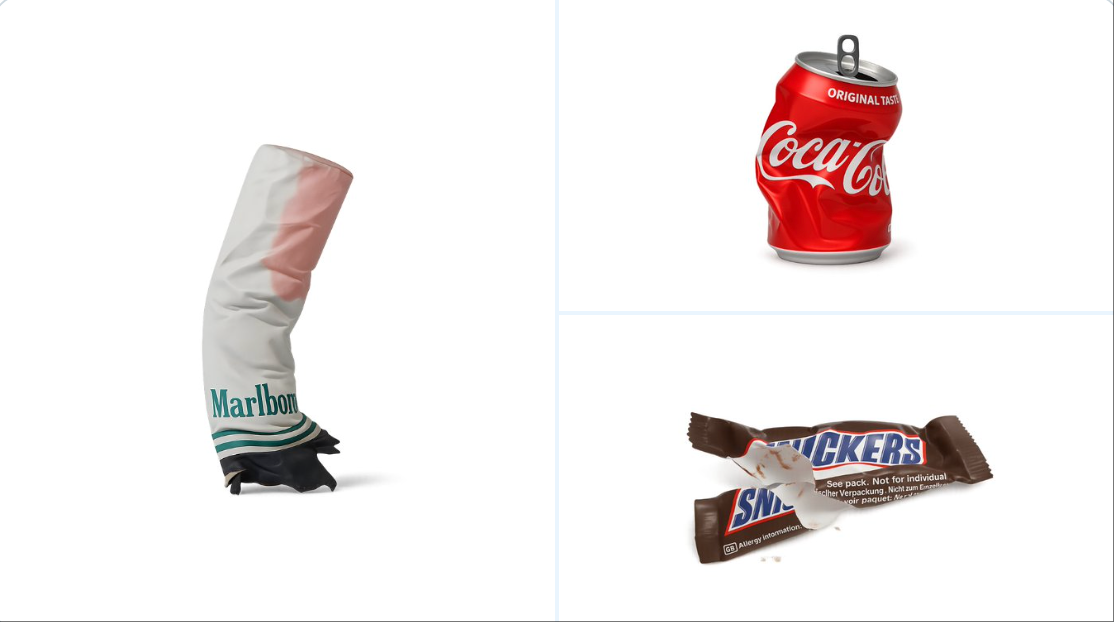
retexture the image attached based on the JSON below: { "style_name": "Transparent Studio Render", "visual_rules": { "form": { "shape": "preserve original object shape", "outline": "no outlines, use smooth geometry transitions and bevels" }, "lighting": { "style": "studio-style 3-point lighting or soft HDRI setup", "highlight": "subtle specular highlights for semi-matte plastic or coated surfaces", "shadow": "soft drop shadow directly beneath the object, cast on a translucent floor plane" }, "texture": { "surface": "smooth or lightly textured based on object, clean shader setup with minimal noise", "branding": "bold and high-contrast, treated as printed decals or sticker-style labels" }, "material": { "finish": "semi-matte or satin shader, mimicking printed plastic or coated materials" }, "color_handling": { "strategy": "make the object's primary color the focal point", "enhancement": "slightly boosted saturation and contrast for clean product visualization" }, "background": { "type": "fully transparent (alpha channel)", "shadow": "optional soft drop shadow directly beneath the object to ground it visually" } }, "rendering": { "camera_angle": "centered front view or slightly elevated for dimensional clarity", "depth_of_field": "neutral or slightly shallow to keep object fully sharp", "background_blur": "none, background remains transparent" } }
About this prompt
다음 JSON에 따라 첨부된 이미지에 재질을 다시 입히세요: { “style_name”: “투명 스튜디오 렌더링”, “visual_rules”: { “form”: { “shape”: “원본 객체 형태 유지”, “outline”: “윤곽선 없음, 부드러운 기하학적 전환과 베벨 사용” }, “lighting”: { “style”: “스튜디오 스타일의 3점 조명 또는 부드러운 HDRI 설정”, “highlight”: “반 무광 플라스틱 또는 코팅 표면의 미세한 스펙큘러 하이라이트”, “shadow”: “반투명 바닥면에 투사된 객체 바로 아래의 부드러운 그림자” }, “texture”: { “surface”: “객체 기반의 매끄럽거나 약간의 질감, 깨끗한 셰이더 설정, 노이즈 최소화”, “branding”: “굵고 대비가 높으며 인쇄 데칼 또는 스티커식 라벨로 간주” }, “material”: { “finish”: “반 무광 또는 새틴 셰이더, 인쇄 플라스틱 또는 코팅 재질 모방” }, “color_handling”: { “strategy”: “객체의 원래 색상을 초점으로”, “enhancement”: “선명한 제품 시각화를 위해 채도와 대비 약간 향상” }, “background”: { “type”: “완전 투명 (알파 채널)”, “shadow”: “시각적으로 접지되도록 객체 바로 아래의 선택적 부드러운 그림자” } }, “rendering”: { “camera_angle”: “중앙 정면 뷰 또는 치수 명확성을 위해 약간 높임”, “depth_of_field”: “중립적 또는 약간 얕아 객체가 완전히 선명하게 유지”, “background_blur”: “없음, 배경은 투명하게 유지” } }
함께 보면 좋은 프롬프트
View all





자주 묻는 질문
"물체 질감 처리" 프롬프트는 어떤 용도로 쓰나요?
이 branding 프롬프트는 AI 이미지 생성용으로 설계되었습니다. branding 스타일의 결과를 만드는 데 도움을 주며 nano-banana-pro에 최적화되어 있습니다.
이 프롬프트는 어떻게 사용하나요?
프롬프트를 복사한 뒤 자주 사용하는 AI 이미지 생성 도구에 붙여 넣으세요. 화면비, 스타일, 네거티브 프롬프트 등을 조정해 결과를 더 정교하게 만들 수 있습니다.
이 branding 프롬프트에는 어떤 AI 도구가 가장 잘 맞나요?
이 프롬프트는 nano-banana-pro에 맞춰 특별히 최적화되었지만, 다른 인기 있는 image 도구에서도 잘 작동합니다.
이 프롬프트를 수정해도 되나요?
네. 원하는 창작 방향에 맞게 요소를 추가하거나 제거하고, 스타일 설명을 다듬거나, 다른 프롬프트와 조합해 더 독특한 결과를 만들 수 있습니다.