4,263 views306 copies
0Prompt
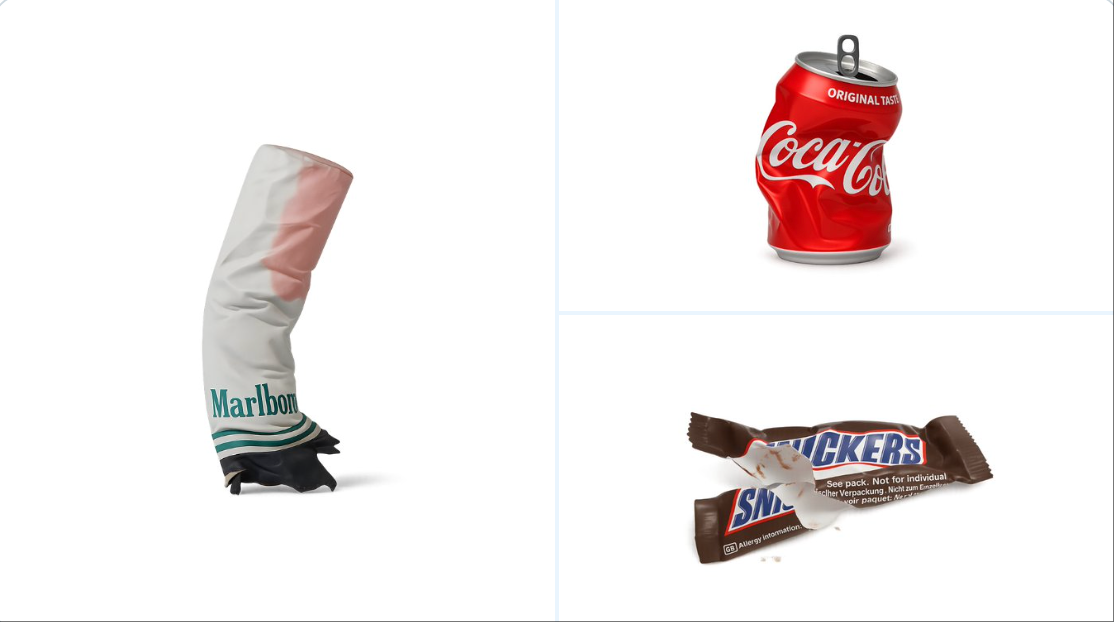
retexture the image attached based on the JSON below: { "style_name": "Transparent Studio Render", "visual_rules": { "form": { "shape": "preserve original object shape", "outline": "no outlines, use smooth geometry transitions and bevels" }, "lighting": { "style": "studio-style 3-point lighting or soft HDRI setup", "highlight": "subtle specular highlights for semi-matte plastic or coated surfaces", "shadow": "soft drop shadow directly beneath the object, cast on a translucent floor plane" }, "texture": { "surface": "smooth or lightly textured based on object, clean shader setup with minimal noise", "branding": "bold and high-contrast, treated as printed decals or sticker-style labels" }, "material": { "finish": "semi-matte or satin shader, mimicking printed plastic or coated materials" }, "color_handling": { "strategy": "make the object's primary color the focal point", "enhancement": "slightly boosted saturation and contrast for clean product visualization" }, "background": { "type": "fully transparent (alpha channel)", "shadow": "optional soft drop shadow directly beneath the object to ground it visually" } }, "rendering": { "camera_angle": "centered front view or slightly elevated for dimensional clarity", "depth_of_field": "neutral or slightly shallow to keep object fully sharp", "background_blur": "none, background remains transparent" } }
About this prompt
According to the following JSON, re-texture the attached image: { "style_name": "Transparent Studio Render", "visual_rules": { "form": { "shape": "Preserve original object shape", "outline": "No outline, use smooth geometric transitions and bevels" }, "lighting": { "style": "Studio-style 3-point lighting or soft HDRI setup", "highlight": "Subtle specular highlights on semi-matte plastic or coated surfaces", "shadow": "Soft drop shadow directly below the object, cast on a translucent floor plane" }, "texture": { "surface": "Smooth or lightly textured based on object, clean shader setup, minimal noise", "branding": "Bold and high contrast, treated as printed decals or sticker-style labels" }, "material": { "finish": "Semi-matte or satin shader, simulating printed plastic or coated material" }, "color_handling": { "strategy": "Use the object's original colors as the focal point", "enhancement": "Slightly increase saturation and contrast for clear product visualization" }, "background": { "type": "Fully transparent (Alpha channel)", "shadow": "Optional soft drop shadow directly below to visually ground it" } }, "render": { "camera_angle": "Centered front view or slightly elevated for dimensional clarity", "depth_of_field": "Neutral or slightly shallow to keep the object fully sharp", "background_blur": "None, background remains transparent" } }
You may also like
View all





Frequently Asked Questions
What is the "Object Texture Processing" prompt used for?
This branding prompt is designed for AI image generation. It helps create branding results and is optimized for nano-banana-pro.
How do I use this prompt?
Simply copy the prompt, then paste it into your preferred AI image generation tool. You can customize settings like aspect ratio, style, or negative prompts to refine the result.
Which AI tools work best with this branding prompt?
This prompt is specifically optimized for nano-banana-pro, but it also works well with other popular image tools.
Can I modify this prompt?
Absolutely. You can customize the prompt to match your creative direction, add or remove elements, refine style descriptors, or combine it with other prompts for unique results.