4,248 views306 copies
0Prompt
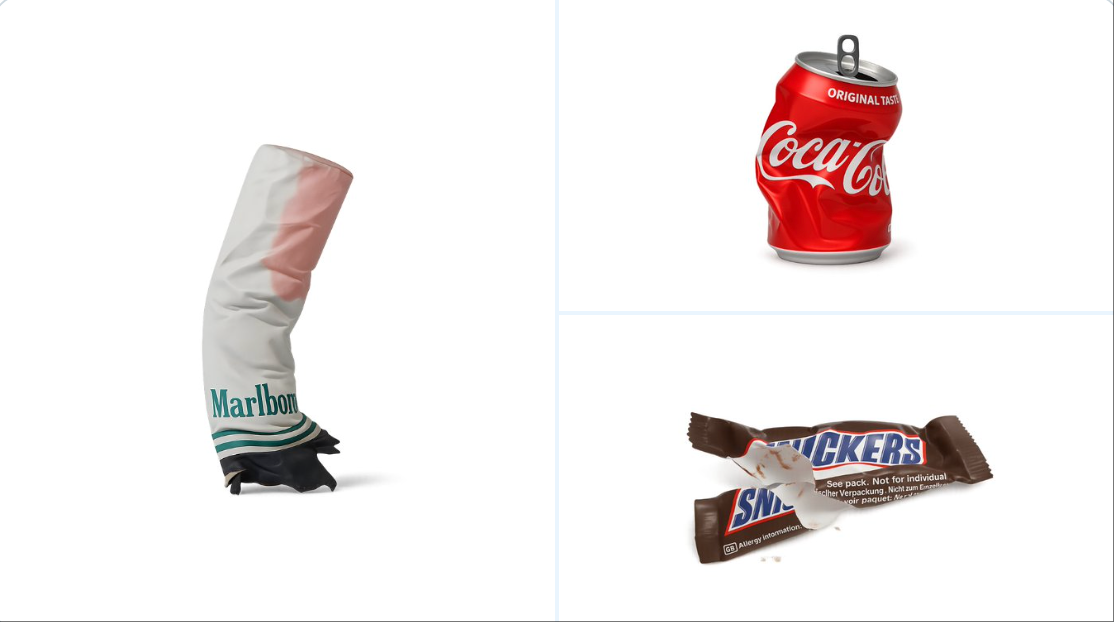
retexture the image attached based on the JSON below: { "style_name": "Transparent Studio Render", "visual_rules": { "form": { "shape": "preserve original object shape", "outline": "no outlines, use smooth geometry transitions and bevels" }, "lighting": { "style": "studio-style 3-point lighting or soft HDRI setup", "highlight": "subtle specular highlights for semi-matte plastic or coated surfaces", "shadow": "soft drop shadow directly beneath the object, cast on a translucent floor plane" }, "texture": { "surface": "smooth or lightly textured based on object, clean shader setup with minimal noise", "branding": "bold and high-contrast, treated as printed decals or sticker-style labels" }, "material": { "finish": "semi-matte or satin shader, mimicking printed plastic or coated materials" }, "color_handling": { "strategy": "make the object's primary color the focal point", "enhancement": "slightly boosted saturation and contrast for clean product visualization" }, "background": { "type": "fully transparent (alpha channel)", "shadow": "optional soft drop shadow directly beneath the object to ground it visually" } }, "rendering": { "camera_angle": "centered front view or slightly elevated for dimensional clarity", "depth_of_field": "neutral or slightly shallow to keep object fully sharp", "background_blur": "none, background remains transparent" } }
About this prompt
Realiza un retexturizado de la imagen adjunta según el siguiente JSON: { "style_name": "Render de estudio transparente", "visual_rules": { "form": { "shape": "Conservar la forma original del objeto", "outline": "Sin contorno, usar transiciones geométricas suaves y biseles" }, "lighting": { "style": "Iluminación de 3 puntos estilo estudio o configuración suave de HDRI", "highlight": "Reflejos especulares sutiles en superficies de plástico semimate o recubiertas", "shadow": "Proyección suave justo debajo del objeto, sobre un plano de piso semitransparente" }, "texture": { "surface": "Superficie suave o ligeramente texturizada basada en el objeto, configuración limpia de shaders, ruido mínimo", "branding": "Negrita y de alto contraste, tratada como calcomanía impresa o etiqueta tipo pegatina" }, "material": { "finish": "Shader semimate o satinado, simulando plástico impreso o material recubierto" }, "color_handling": { "strategy": "Usar el color original del objeto como punto focal", "enhancement": "Aumentar ligeramente la saturación y el contraste para una visualización clara del producto" }, "background": { "type": "Completamente transparente (canal Alfa)", "shadow": "Proyección suave opcional justo debajo, para anclaje visual" } }, "rendering": { "camera_angle": "Vista frontal centrada o ligeramente elevada para mayor claridad dimensional", "depth_of_field": "Neutral o ligeramente superficial, manteniendo el objeto completamente nítido", "background_blur": "Ninguno, el fondo permanece transparente" } }
También te puede gustar
View all





Preguntas frecuentes
¿Para qué sirve el prompt "Procesamiento de texturas de objetos"?
Este prompt de branding está diseñado para generación de imágenes con IA. Ayuda a crear resultados con estilo branding y está optimizado para nano-banana-pro.
¿Cómo uso este prompt?
Copia el prompt y pégalo en tu herramienta de generación de imágenes con IA preferida. Puedes ajustar la relación de aspecto, el estilo o los prompts negativos para afinar el resultado.
¿Qué herramientas de IA funcionan mejor con este prompt de branding?
Este prompt está optimizado específicamente para nano-banana-pro, pero también funciona bien con otras herramientas populares de image.
¿Puedo modificar este prompt?
Sí. Puedes adaptar el prompt a tu dirección creativa, añadir o quitar elementos, refinar los descriptores de estilo o combinarlo con otros prompts para obtener resultados únicos.