4,260 views306 copies
0Prompt
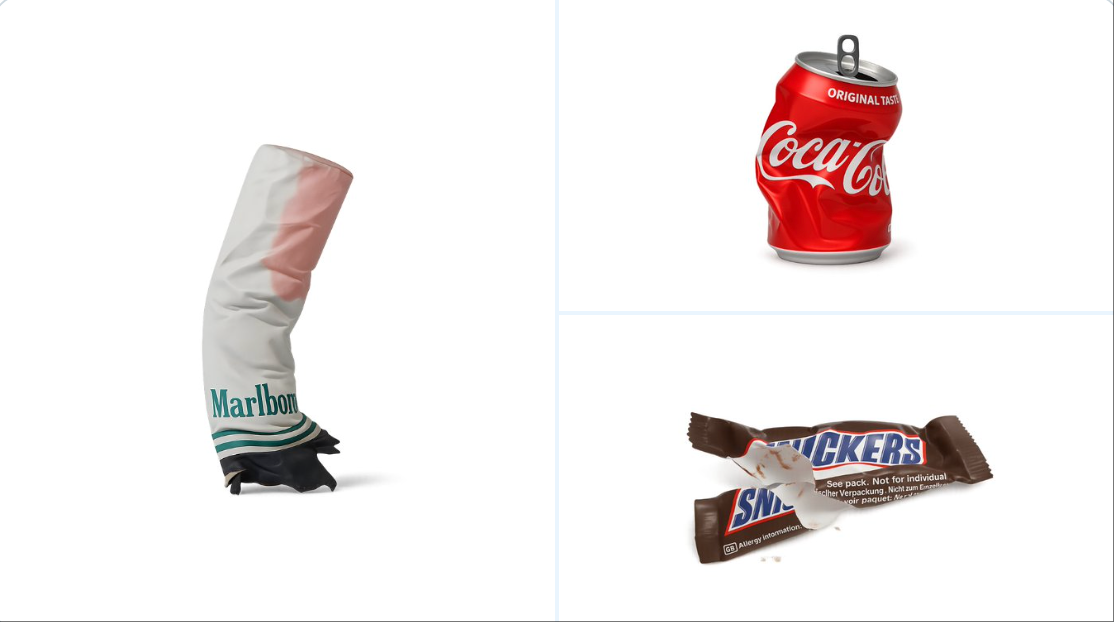
retexture the image attached based on the JSON below: { "style_name": "Transparent Studio Render", "visual_rules": { "form": { "shape": "preserve original object shape", "outline": "no outlines, use smooth geometry transitions and bevels" }, "lighting": { "style": "studio-style 3-point lighting or soft HDRI setup", "highlight": "subtle specular highlights for semi-matte plastic or coated surfaces", "shadow": "soft drop shadow directly beneath the object, cast on a translucent floor plane" }, "texture": { "surface": "smooth or lightly textured based on object, clean shader setup with minimal noise", "branding": "bold and high-contrast, treated as printed decals or sticker-style labels" }, "material": { "finish": "semi-matte or satin shader, mimicking printed plastic or coated materials" }, "color_handling": { "strategy": "make the object's primary color the focal point", "enhancement": "slightly boosted saturation and contrast for clean product visualization" }, "background": { "type": "fully transparent (alpha channel)", "shadow": "optional soft drop shadow directly beneath the object to ground it visually" } }, "rendering": { "camera_angle": "centered front view or slightly elevated for dimensional clarity", "depth_of_field": "neutral or slightly shallow to keep object fully sharp", "background_blur": "none, background remains transparent" } }
About this prompt
以下のJSONに基づいて添付画像のテクスチャを再処理してください: { “style_name”: “透明スタジオレンダリング”, “visual_rules”: { “form”: { “shape”: “元のオブジェクト形状を保持”, “outline”: “輪郭なし、滑らかな幾何学的遷移とベベルを使用” }, “lighting”: { “style”: “スタジオスタイルの3点照明またはソフトHDRI設定”, “highlight”: “半マットプラスチックまたはコーティング表面の微妙なスペキュラハイライト”, “shadow”: “オブジェクト直下のソフトドロップシャドウ、半透明フロア平面に投影” }, “texture”: { “surface”: “オブジェクトベースの滑らかまたはわずかなテクスチャ、クリーンなシェーダー設定、ノイズ最小限”, “branding”: “太字でコントラスト高め、印刷デカールまたはステッカー式ラベルとして扱う” }, “material”: { “finish”: “半マットまたはサテンシェーダー、印刷プラスチックまたはコーティング材質をシミュレート” }, “color_handling”: { “strategy”: “オブジェクトの元の色を焦点として使用”, “enhancement”: “鮮明な製品視覚化のため、彩度とコントラストをわずかに向上” }, “background”: { “type”: “完全透明(アルファチャンネル)”, “shadow”: “オプションのソフトシャドウを直下に配置し、視覚的に接地させる” } }, “rendering”: { “camera_angle”: “中央正面ビューまたはわずかに高めて寸法の明確さを向上”, “depth_of_field”: “中性またはやや浅く、物体を完全に鮮明に保持”, “background_blur”: “なし、背景は透明を保持” } }
こちらもおすすめ
View all





よくある質問
「アイテムテクスチャ処理」のプロンプトは何に使いますか?
このbrandingプロンプトはAI画像生成向けです。branding系の結果を作るのに役立ち、nano-banana-pro向けに最適化されています。
このプロンプトはどう使いますか?
プロンプトをコピーして、利用しているAI画像生成ツールに貼り付けてください。アスペクト比、スタイル、ネガティブプロンプトなどを調整して結果を詰められます。
このbrandingプロンプトに最適なAIツールは何ですか?
このプロンプトは nano-banana-pro 向けに最適化されていますが、他の主要なimageツールでも十分に機能します。
このプロンプトは編集できますか?
はい。自分の制作方針に合わせて、要素の追加・削除、スタイル記述の調整、他のプロンプトとの組み合わせなどを行えます。