1,125 views346 copies
0Prompt
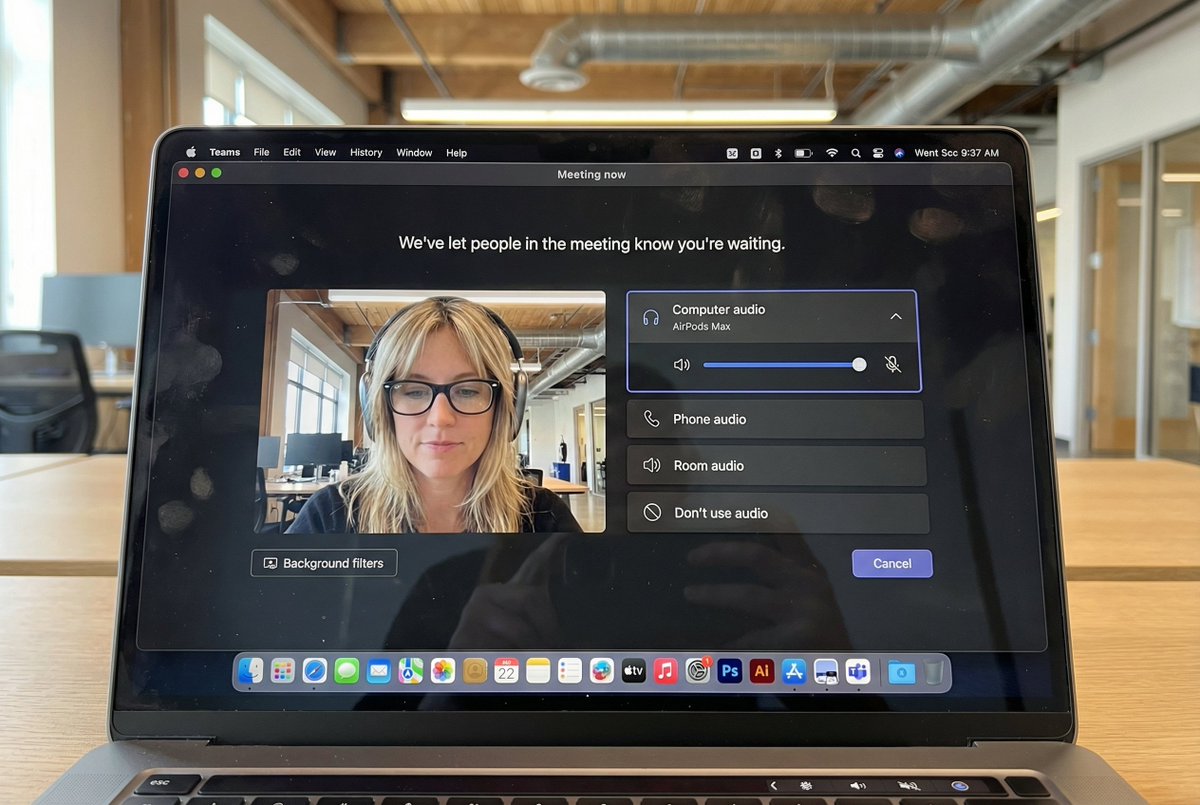
{ "task": "hyper_realistic_macbook_screen_photography", "reference_logic": "exact_microsoft_teams_waiting_room_ui_macos", "output": { "type": "single_image", "resolution": "ultra_high_resolution_8k", "realism": "indistinguishable_from_real_laptop_photo", "capture_style": "iphone_photo_of_macbook_screen", "post_processing": "none" }, "scene": { "application": "Microsoft Teams", "platform": "macOS", "ui_state": "meeting_waiting_room", "top_status_text": "Meeting now", "center_message": "We've let people in the meeting know you're waiting.", "background": "pure_black_dark_mode" }, "ui_layout": { "left_panel": { "video_preview": { "position": "bottom_left", "aspect_ratio": "landscape", "camera_toggle": "on", "background_filters_button": "visible_below_preview" } }, "right_panel": { "audio_section": { "title": "Computer audio", "selected_device": "AirPods Max", "volume_slider": "horizontal_blue_indicator", "mute_toggle": "off" }, "audio_options": [ "Phone audio", "Room audio", "Don't use audio" ], "cancel_button": { "label": "Cancel", "position": "bottom_right", "style": "rounded_rectangle" } } }, "subject": { "gender": "female", "hair": { "color": "natural_blonde", "style": "soft_bangs_with_loose_layers", "texture": "individual_strands_visible" }, "face": { "skin": "true_human_skin_texture", "details": "visible_pores_micro_imperfections", "retouching": "none" }, "eyewear": { "brand": "Ray-Ban", "model": "Wayfarer", "type": "prescription_glasses", "frame_color": "black", "lens_reflection": "subtle_real_world_glare" }, "headphones": { "model": "AirPods Max", "color": "space_gray", "fit": "natural_over_ear_position" }, "clothing": { "top": "neutral_crop_top", "style": "casual_minimal" }, "expression": "calm_focused_waiting", "gaze": "slightly_downward" }, "environment": { "background": "modern_open_office", "ceiling": "exposed_industrial_ducts", "lighting": { "type": "soft_natural_daylight", "mixed_with": "indoor_office_lighting", "temperature": "5200K" } }, "screen_reflection": { "enabled": true, "source": "same_subject_as_video_preview", "reflection_type": "soft_glass_reflection", "intensity": "very_subtle", "opacity": 0.05, "sharpness": "low", "distortion": "slight_glass_warp", "positioning": "offset_not_centered", "visibility_rules": { "ui_text": "fully_readable", "icons": "unobstructed", "reflection_never_overpowers_ui": true }, "realism_notes": [ "not_mirror_like", "not_double_face", "no_symmetry", "appears_only_on_dark_areas" ] }, "macos_elements": { "dock": { "visible": true, "style": "macos_default_big_sur_or_later", "reflection": "subtle", "indicator_dot": "visible_under_active_apps", "icons": [ "Finder", "Mail", "Calendar", "Microsoft Teams", "Adobe Illustrator", "Adobe InDesign", "Adobe After Effects", "Adobe Lightroom", "Adobe Photoshop", "Adobe Premiere Pro", "App Store", "System Settings" ] }, "menu_bar": { "visibility": "partial_top_edge", "elements": [ "WiFi", "Battery", "Time", "macOS_control_icons" ] } }, "camera": { "device": "iPhone", "angle": "slightly_off_axis", "handheld": true, "screen_artifacts": [ "soft_glass_reflection", "minor_glare", "fingerprint_smudges", "dust_particles", "moire_pattern" ] }, "color_profile": { "contrast": "natural_display_contrast", "saturation": "neutral_realistic", "white_balance": "accurate_screen_calibrated" }, "negative_prompt": [ "generic_video_call_ui", "zoom_interface", "google_meet_ui", "fake_buttons", "wrong_fonts", "misaligned_panels", "ai_generated_ui", "blurred_text", "plastic_skin", "over_sharpening", "mirror_reflection", "double_face", "incorrect_dock_icons" ] }
About this prompt
{ "ภารกิจ": "การถ่ายภาพหน้าจอ Macbook แบบสมจริงสูง", "reference_logic": "exact_microsoft_teams_waiting_room_ui_macos", "ผลลัพธ์": { "type": "single_image", "ความละเอียด": "超高分辨率_8k", "ความสมจริง": "แยกไม่ออกจากภาพถ่ายแล็ปท็อปจริง", "capture_style": "iphone_photo_of_macbook_screen", "post_processing": "none" }, "ฉาก": { "แอปพลิเคชัน": "Microsoft Teams", "แพลตฟอร์ม": "macOS", "ui_state": "ห้องรอประชุม", "top_status_text": "กำลังประชุม", "center_message": "เราได้แจ้งผู้อื่นในห้องประชุมแล้วว่าคุณกำลังรออยู่", "พื้นหลัง": "ดำทึบ_โหมดมืด" }, "ui_layout": { "left_panel": { "video_preview": { "ตำแหน่ง": "มุมซ้ายล่าง", "aspect_ratio": "landscape", "camera_toggle": "on", "background_filters_button": "visible_below_preview" } }, "right_panel": { "audio_section": { "หัวข้อ": "เสียงคอมพิวเตอร์", "selected_device": "AirPods Max", "แถบเลื่อนระดับเสียง": "ตัวบ่งชี้แนวนอนสีน้ำเงิน", "mute_toggle": "off" }, "audio_options": [ "เสียงโทรศัพท์", "เสียงห้อง", "ไม่ใช้เสียง" ], "ปุ่มยกเลิก": { "ป้ายกำกับ": "ยกเลิก", "ตำแหน่ง": "มุมขวาล่าง", "สไตล์": "สี่เหลี่ยมมุมโค้ง" } } }, "ธีม": { "เพศ": "หญิง", "ผม": { "สี": "บลอนด์ธรรมชาติ", "style": "soft_bangs_with_loose_layers", "texture": "individual_strands_visible" }, "ใบหน้า": { "ผิว": "พื้นผิวผิวมนุษย์จริง", "รายละเอียด": "รูขุมขนและความไม่สมบูรณ์เล็กน้อยมองเห็นได้", "การปรับแต่ง": "none" }, "แว่นตา": { "แบรนด์": "Ray-Ban", "รุ่น": "Wayfarer", "type": "แว่นสายตา", "frame_color": "ดำ", "lens_reflection": "subtle_real_world_glare" }, "หูฟัง": { "รุ่น": "AirPods Max", "สี": "Space Gray", "fit": "natural_over_ear_position" }, "เสื้อผ้า": { "เสื้อบน": "เสื้อครอปโทนกลาง", "สไตล์": "เรียบง่ายสไตล์สบายๆ" }, "อารมณ์": "สงบมีสมาธิในการรอ", "สายตา": "มองลงเล็กน้อย" }, "สภาพแวดล้อม": { "พื้นหลัง": "ออฟฟิศเปิดโล่งสมัยใหม่", "เพดาน": "ท่ออุตสาหกรรมแบบเปิด", "แสง": { "type": "แสงธรรมชาติอ่อนนุ่ม", "mixed_with": "แสงไฟออฟฟิศภายใน", "อุณหภูมิ": "5200K" } }, "screen_reflection": { "เปิดใช้งาน": true, "source": "same_subject_as_video_preview", "reflection_type": "soft_glass_reflection", "ความเข้ม": "ละเอียดอ่อนมาก", "ความทึบแสง": 0.05, "ความคมชัด": "ต่ำ", "การบิดเบือน": "การบิดเบือนกระจกเล็กน้อย", "ตำแหน่ง": "offset_not_centered", "visibility_rules": { "ui_text": "อ่านได้ชัดเจน", "ไอคอน": "ไม่ถูกบดบัง", "reflection_never_overpowers_ui": true }, "realism_notes": [ "not_mirror_like", "ไม่ใช่สองด้าน", "no_symmetry", "ปรากฏเฉพาะในพื้นที่มืด" ] }, "macos_elements": { "Dock": { "มองเห็นได้": true, "style": "macos_default_big_sur_or_later", "การสะท้อน": "ละเอียดอ่อน", "indicator_dot": "visible_under_active_apps", "ไอคอน": [ "Finder", "Mail", "Calendar", "Microsoft Teams", "Adobe Illustrator", "Adobe InDesign", "Adobe After Effects", "Adobe Lightroom", "Adobe Photoshop", "Adobe Premiere Pro", "App Store", "System Settings" ] }, "menu_bar": { "การมองเห็น": "ขอบบนบางส่วน", "องค์ประกอบ": [ "Wi-Fi", "แบตเตอรี่", "เวลา", "macOS_control_icons" ] } }, "กล้อง": { "อุปกรณ์": "iPhone", "มุม": "เอียงจากแกนเล็กน้อย", "ถือด้วยมือ": true, "screen_artifacts": [ "soft_glass_reflection", "แสงสะท้อนเล็กน้อย", "รอยนิ้วมือ", "อนุภาคฝุ่น", "ลายโมรา" ] }, "color_profile": { "ความคมชัด": "natural_display_contrast", "ความอิ่มตัว": "กลาง_สมจริง", "white_balance": "accur_screen_calibrated" }, "negative_prompt": [ "generic_video_call_ui", "zoom_interface", "google_meet_ui", "fake_buttons", "wrong_fonts", "แผงผิดตำแหน่ง", "ai_generated_ui", "ข้อความเบลอ", "ผิวพลาสติก", "ความคมชัดเกิน", "การสะท้อนแบบกระจก", "สองด้าน", "incorrect_dock_icons" ] }
คุณอาจชอบสิ่งนี้ด้วย
View all





คำถามที่พบบ่อย
พรอมต์ "ภาพประชุมวิดีโอบนหน้าจอ Macbook เหมือนจริงสุดขีด" ใช้สำหรับอะไร?
พรอมต์หมวด branding นี้เหมาะสำหรับการสร้างภาพด้วย AI ช่วยสร้างผลลัพธ์สไตล์ branding และถูกปรับให้เหมาะกับ Nano banana pro
ฉันควรใช้พรอมต์นี้อย่างไร?
คัดลอกพรอมต์แล้วนำไปวางในเครื่องมือสร้างภาพ AI ที่คุณใช้งานอยู่ จากนั้นสามารถปรับอัตราส่วนภาพ สไตล์ หรือเนกาทีฟพรอมต์เพื่อเกลาผลลัพธ์ได้
เครื่องมือ AI ใดเหมาะกับพรอมต์ branding นี้มากที่สุด?
พรอมต์นี้ถูกปรับให้เหมาะกับ Nano banana pro โดยเฉพาะ แต่ก็ยังใช้งานได้ดีกับเครื่องมือimageยอดนิยมอื่น ๆ
ฉันสามารถปรับแก้พรอมต์นี้ได้ไหม?
ได้ คุณสามารถปรับพรอมต์ให้เข้ากับทิศทางงานสร้างสรรค์ของคุณ เพิ่มหรือลดองค์ประกอบ ปรับคำอธิบายสไตล์ หรือผสมกับพรอมต์อื่นเพื่อให้ได้ผลลัพธ์ที่แตกต่างยิ่งขึ้น