1,122 views346 copies
0Prompt
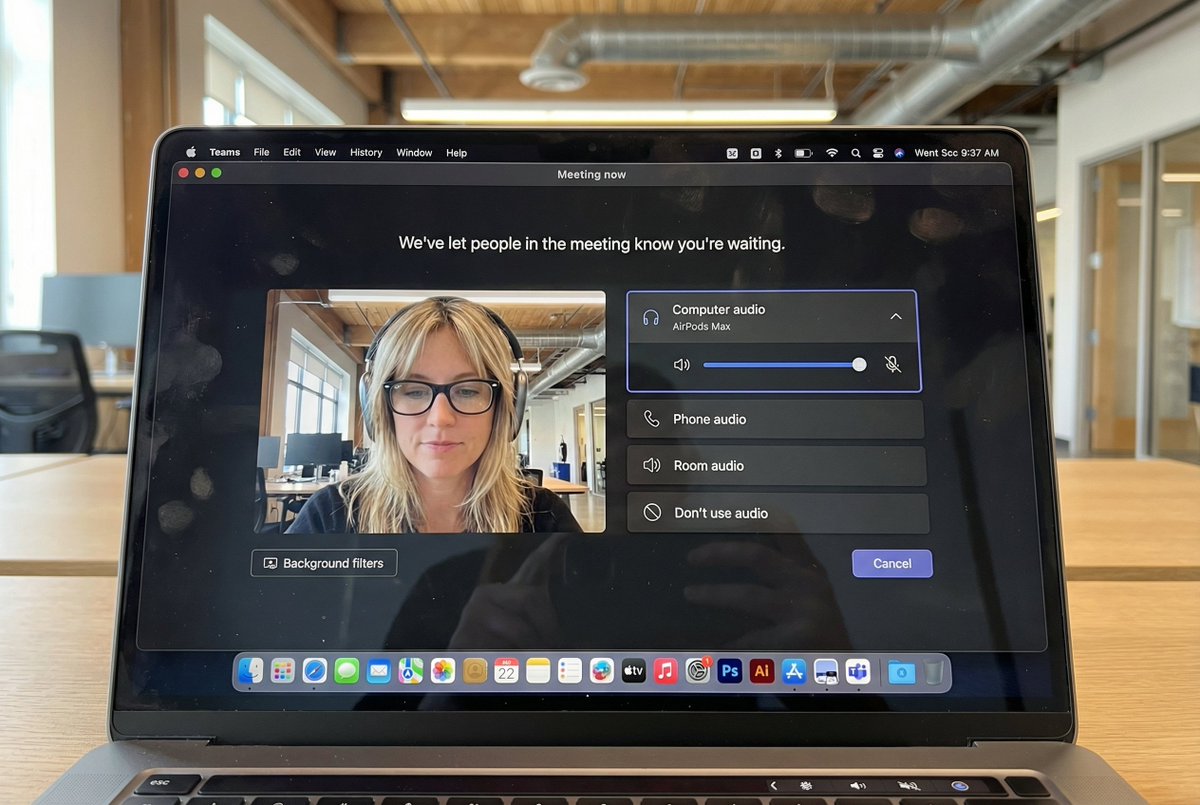
{ "task": "hyper_realistic_macbook_screen_photography", "reference_logic": "exact_microsoft_teams_waiting_room_ui_macos", "output": { "type": "single_image", "resolution": "ultra_high_resolution_8k", "realism": "indistinguishable_from_real_laptop_photo", "capture_style": "iphone_photo_of_macbook_screen", "post_processing": "none" }, "scene": { "application": "Microsoft Teams", "platform": "macOS", "ui_state": "meeting_waiting_room", "top_status_text": "Meeting now", "center_message": "We've let people in the meeting know you're waiting.", "background": "pure_black_dark_mode" }, "ui_layout": { "left_panel": { "video_preview": { "position": "bottom_left", "aspect_ratio": "landscape", "camera_toggle": "on", "background_filters_button": "visible_below_preview" } }, "right_panel": { "audio_section": { "title": "Computer audio", "selected_device": "AirPods Max", "volume_slider": "horizontal_blue_indicator", "mute_toggle": "off" }, "audio_options": [ "Phone audio", "Room audio", "Don't use audio" ], "cancel_button": { "label": "Cancel", "position": "bottom_right", "style": "rounded_rectangle" } } }, "subject": { "gender": "female", "hair": { "color": "natural_blonde", "style": "soft_bangs_with_loose_layers", "texture": "individual_strands_visible" }, "face": { "skin": "true_human_skin_texture", "details": "visible_pores_micro_imperfections", "retouching": "none" }, "eyewear": { "brand": "Ray-Ban", "model": "Wayfarer", "type": "prescription_glasses", "frame_color": "black", "lens_reflection": "subtle_real_world_glare" }, "headphones": { "model": "AirPods Max", "color": "space_gray", "fit": "natural_over_ear_position" }, "clothing": { "top": "neutral_crop_top", "style": "casual_minimal" }, "expression": "calm_focused_waiting", "gaze": "slightly_downward" }, "environment": { "background": "modern_open_office", "ceiling": "exposed_industrial_ducts", "lighting": { "type": "soft_natural_daylight", "mixed_with": "indoor_office_lighting", "temperature": "5200K" } }, "screen_reflection": { "enabled": true, "source": "same_subject_as_video_preview", "reflection_type": "soft_glass_reflection", "intensity": "very_subtle", "opacity": 0.05, "sharpness": "low", "distortion": "slight_glass_warp", "positioning": "offset_not_centered", "visibility_rules": { "ui_text": "fully_readable", "icons": "unobstructed", "reflection_never_overpowers_ui": true }, "realism_notes": [ "not_mirror_like", "not_double_face", "no_symmetry", "appears_only_on_dark_areas" ] }, "macos_elements": { "dock": { "visible": true, "style": "macos_default_big_sur_or_later", "reflection": "subtle", "indicator_dot": "visible_under_active_apps", "icons": [ "Finder", "Mail", "Calendar", "Microsoft Teams", "Adobe Illustrator", "Adobe InDesign", "Adobe After Effects", "Adobe Lightroom", "Adobe Photoshop", "Adobe Premiere Pro", "App Store", "System Settings" ] }, "menu_bar": { "visibility": "partial_top_edge", "elements": [ "WiFi", "Battery", "Time", "macOS_control_icons" ] } }, "camera": { "device": "iPhone", "angle": "slightly_off_axis", "handheld": true, "screen_artifacts": [ "soft_glass_reflection", "minor_glare", "fingerprint_smudges", "dust_particles", "moire_pattern" ] }, "color_profile": { "contrast": "natural_display_contrast", "saturation": "neutral_realistic", "white_balance": "accurate_screen_calibrated" }, "negative_prompt": [ "generic_video_call_ui", "zoom_interface", "google_meet_ui", "fake_buttons", "wrong_fonts", "misaligned_panels", "ai_generated_ui", "blurred_text", "plastic_skin", "over_sharpening", "mirror_reflection", "double_face", "incorrect_dock_icons" ] }
About this prompt
{ "任务": "Hyperrealistische Macbook-Bildschirmfotografie", "reference_logic": "exact_microsoft_teams_waiting_room_ui_macos", "输出": { "type": "single_image", "分辨率": "Ultrahohe_Auflösung_8k", "真实感": "Von echten Laptop-Fotos nicht zu unterscheiden", "capture_style": "iphone_photo_of_macbook_screen", "post_processing": "Keine" }, "场景": { "应用程序": "Microsoft Teams", "平台": "macOS", "ui_state": "Warteraum für Besprechungen", "top_status_text": "Besprechung läuft", "center_message": "Wir haben die anderen Personen in der Besprechung darüber informiert, dass Sie warten.", "背景": "Rein schwarz_Dunkelmodus" }, "ui_layout": { "left_panel": { "video_preview": { "位置": "Untere linke Ecke", "aspect_ratio": "Querformat", "camera_toggle": "Eingeschaltet", "background_filters_button": "visible_below_preview" } }, "right_panel": { "audio_section": { "标题": "Computeraudio", "selected_device": "AirPods Max", "音量滑块": "Horizontaler blauer Indikator", "mute_toggle": "Ausgeschaltet" }, "audio_options": [ "Telefonaudio", "Raumaudio", "Kein Audio verwenden" ], "取消按钮": { "标签": "Abbrechen", "位置": "Untere rechte Ecke", "样式": "Abgerundetes Rechteck" } } }, "主题": { "性别": "Weiblich", "头发": { "颜色": "Natürliches Blond", "style": "soft_bangs_with_loose_layers", "texture": "individual_strands_visible" }, "脸": { "皮肤": "Echte menschliche Hauttextur", "详情": "Sichtbare Poren, leichte Unreinheiten", "修饰": "Keine" }, "眼镜": { "品牌": "Ray-Ban", "型号": "Traveler", "type": "Verschreibungspflichtige Brille", "frame_color": "Schwarz", "lens_reflection": "subtle_real_world_glare" }, "耳机": { "型号": "AirPods Max", "颜色": "Space Grau", "fit": "natural_over_ear_position" }, "衣服": { "上衣": "Neutrales Crop Top", "风格": "Casual minimalistisch" }, "表情": "Ruhig konzentriertes Warten", "凝视": "Leicht nach unten" }, "环境": { "背景": "Modernes Open-Space-Büro", "天花板": "Freiliegende Industrierohre", "灯光": { "type": "Weiches natürliches Tageslicht", "mixed_with": "Innenraum-Bürobeleuchtung", "温度": "5200K" } }, "screen_reflection": { "启用": true, "source": "same_subject_as_video_preview", "reflection_type": "soft_glass_reflection", "强度": "Sehr subtil", "不透明度": 0.05, "锐度": "Niedrig", "失真": "Leichte Glasverzerrung", "定位": "offset_not_centered", "visibility_rules": { "ui_text": "Vollständig lesbar", "图标": "Ungestört", "reflection_never_overpowers_ui": true }, "realism_notes": [ "not_mirror_like", "非双面", "no_symmetry", "nur in dunklen Bereichen sichtbar" ] }, "macos_elements": { "码头": { "可见": "Ja", "style": "macos_default_big_sur_or_later", "反思": "Subtil", "indicator_dot": "visible_under_active_apps", "图标": [ "Finder", "Mail", "Kalender", "Microsoft Teams", "Adobe Illustrator", "Adobe InDesign", "Adobe After Effects", "Adobe Lightroom", "Adobe Photoshop", "Adobe Premiere Pro", "App Store", "Systemeinstellungen" ] }, "menu_bar": { "可见性": "Partieller oberer Rand", "元素": [ "Wi-Fi", "Akku", "Uhrzeit", "macOS_control_icons" ] } }, "相机": { "设备": "iPhone", "角度": "Leicht außerhalb der Achse", "手持式": "Ja", "screen_artifacts": [ "soft_glass_reflection", "Leichte Blendung", "Fingerabdruck-Schmutz", "Staubpartikel", "Moiré-Muster" ] }, "color_profile": { "对比度": "Natürlicher Display-Kontrast", "饱和度": "Neutral_realistisch", "white_balance": "accur_screen_calibrated" }, "negative_prompt": [ "generic_video_call_ui", "zoom_interface", "google_meet_ui", "fake_buttons", "wrong_fonts", "错位面板", "ai_generated_ui", "unscharfer Text", "Plastikhaut", "übermäßig geschärft", "Spiegelreflexion", "双面", "incorrect_dock_icons" ] }
Das könnte Ihnen auch gefallen
View all





Häufig gestellte Fragen
Wofür wird der Prompt „Hyperrealistische MacBook-Bildschirm-Videokonferenz“ verwendet?
Dieser branding-Prompt ist für KI-Bildgenerierung gedacht. Er hilft dabei, Ergebnisse im Stil branding zu erzeugen und ist für Nano banana pro optimiert.
Wie verwende ich diesen Prompt?
Kopieren Sie den Prompt und fügen Sie ihn in Ihr bevorzugtes KI-Bildtool ein. Sie können Einstellungen wie Seitenverhältnis, Stil oder Negativ-Prompts anpassen, um das Ergebnis zu verfeinern.
Welche KI-Tools eignen sich am besten für diesen branding-Prompt?
Dieser Prompt ist speziell für Nano banana pro optimiert, funktioniert aber auch gut mit anderen beliebten image-Tools.
Kann ich diesen Prompt anpassen?
Ja. Sie können den Prompt an Ihre kreative Richtung anpassen, Elemente hinzufügen oder entfernen, Stilbeschreibungen verfeinern oder ihn mit anderen Prompts kombinieren, um einzigartige Ergebnisse zu erzielen.