1,111 views346 copies
0Prompt
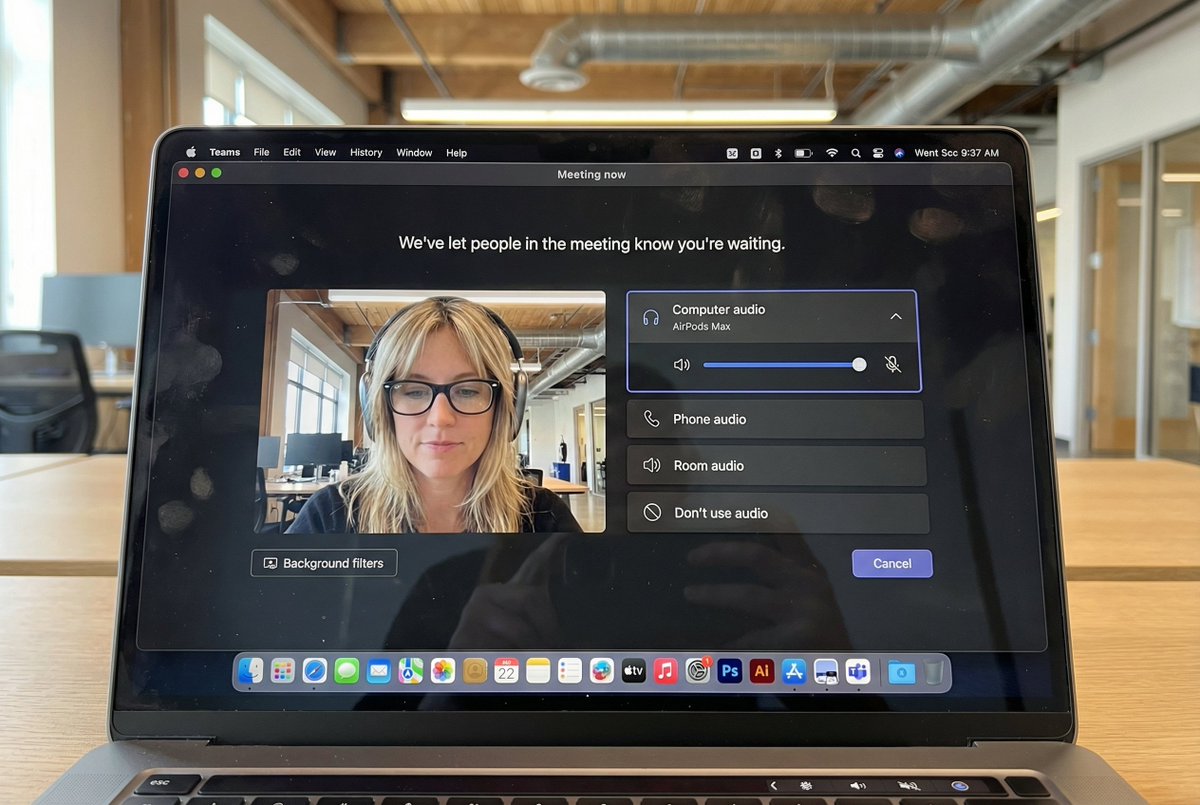
{ "task": "hyper_realistic_macbook_screen_photography", "reference_logic": "exact_microsoft_teams_waiting_room_ui_macos", "output": { "type": "single_image", "resolution": "ultra_high_resolution_8k", "realism": "indistinguishable_from_real_laptop_photo", "capture_style": "iphone_photo_of_macbook_screen", "post_processing": "none" }, "scene": { "application": "Microsoft Teams", "platform": "macOS", "ui_state": "meeting_waiting_room", "top_status_text": "Meeting now", "center_message": "We've let people in the meeting know you're waiting.", "background": "pure_black_dark_mode" }, "ui_layout": { "left_panel": { "video_preview": { "position": "bottom_left", "aspect_ratio": "landscape", "camera_toggle": "on", "background_filters_button": "visible_below_preview" } }, "right_panel": { "audio_section": { "title": "Computer audio", "selected_device": "AirPods Max", "volume_slider": "horizontal_blue_indicator", "mute_toggle": "off" }, "audio_options": [ "Phone audio", "Room audio", "Don't use audio" ], "cancel_button": { "label": "Cancel", "position": "bottom_right", "style": "rounded_rectangle" } } }, "subject": { "gender": "female", "hair": { "color": "natural_blonde", "style": "soft_bangs_with_loose_layers", "texture": "individual_strands_visible" }, "face": { "skin": "true_human_skin_texture", "details": "visible_pores_micro_imperfections", "retouching": "none" }, "eyewear": { "brand": "Ray-Ban", "model": "Wayfarer", "type": "prescription_glasses", "frame_color": "black", "lens_reflection": "subtle_real_world_glare" }, "headphones": { "model": "AirPods Max", "color": "space_gray", "fit": "natural_over_ear_position" }, "clothing": { "top": "neutral_crop_top", "style": "casual_minimal" }, "expression": "calm_focused_waiting", "gaze": "slightly_downward" }, "environment": { "background": "modern_open_office", "ceiling": "exposed_industrial_ducts", "lighting": { "type": "soft_natural_daylight", "mixed_with": "indoor_office_lighting", "temperature": "5200K" } }, "screen_reflection": { "enabled": true, "source": "same_subject_as_video_preview", "reflection_type": "soft_glass_reflection", "intensity": "very_subtle", "opacity": 0.05, "sharpness": "low", "distortion": "slight_glass_warp", "positioning": "offset_not_centered", "visibility_rules": { "ui_text": "fully_readable", "icons": "unobstructed", "reflection_never_overpowers_ui": true }, "realism_notes": [ "not_mirror_like", "not_double_face", "no_symmetry", "appears_only_on_dark_areas" ] }, "macos_elements": { "dock": { "visible": true, "style": "macos_default_big_sur_or_later", "reflection": "subtle", "indicator_dot": "visible_under_active_apps", "icons": [ "Finder", "Mail", "Calendar", "Microsoft Teams", "Adobe Illustrator", "Adobe InDesign", "Adobe After Effects", "Adobe Lightroom", "Adobe Photoshop", "Adobe Premiere Pro", "App Store", "System Settings" ] }, "menu_bar": { "visibility": "partial_top_edge", "elements": [ "WiFi", "Battery", "Time", "macOS_control_icons" ] } }, "camera": { "device": "iPhone", "angle": "slightly_off_axis", "handheld": true, "screen_artifacts": [ "soft_glass_reflection", "minor_glare", "fingerprint_smudges", "dust_particles", "moire_pattern" ] }, "color_profile": { "contrast": "natural_display_contrast", "saturation": "neutral_realistic", "white_balance": "accurate_screen_calibrated" }, "negative_prompt": [ "generic_video_call_ui", "zoom_interface", "google_meet_ui", "fake_buttons", "wrong_fonts", "misaligned_panels", "ai_generated_ui", "blurred_text", "plastic_skin", "over_sharpening", "mirror_reflection", "double_face", "incorrect_dock_icons" ] }
About this prompt
{ "task": "Ultra-realistic Macbook screen photography", "reference_logic": "exact_microsoft_teams_waiting_room_ui_macos", "output": { "type": "single_image", "resolution": "ultra_high_resolution_8k", "realism": "indistinguishable from real laptop photo", "capture_style": "iphone_photo_of_macbook_screen", "post_processing": "none" }, "scene": { "application": "Microsoft Teams", "platform": "macOS", "ui_state": "meeting room waiting room", "top_status_text": "In a meeting", "center_message": "We've let others in the meeting know you're waiting.", "background": "pure_black_dark_mode" }, "ui_layout": { "left_panel": { "video_preview": { "position": "bottom_left", "aspect_ratio": "landscape", "camera_toggle": "on", "background_filters_button": "visible_below_preview" } }, "right_panel": { "audio_section": { "title": "Computer Audio", "selected_device": "AirPods Max", "volume_slider": "horizontal_blue_indicator", "mute_toggle": "off" }, "audio_options": [ "Phone Audio", "Room Audio", "Don't Use Audio" ], "cancel_button": { "label": "Cancel", "position": "bottom_right", "style": "rounded_rectangle" } } }, "subject": { "gender": "female", "hair": { "color": "natural_blonde", "style": "soft_bangs_with_loose_layers", "texture": "individual_strands_visible" }, "face": { "skin": "real_human_skin_texture", "details": "visible_pores_micro_imperfections", "retouching": "none" }, "glasses": { "brand": "Ray-Ban", "model": "Wayfarer", "type": "prescription_glasses", "frame_color": "black", "lens_reflection": "subtle_real_world_glare" }, "headphones": { "model": "AirPods Max", "color": "space_gray", "fit": "natural_over_ear_position" }, "clothing": { "top": "neutral_crop_top", "style": "casual_minimalist" }, "expression": "calm_focused_waiting", "gaze": "slightly_downward" }, "environment": { "background": "modern_open_plan_office", "ceiling": "exposed_industrial_ductwork", "lighting": { "type": "soft_natural_daylight", "mixed_with": "indoor_office_lighting", "temperature": "5200K" } }, "screen_reflection": { "enabled": true, "source": "same_subject_as_video_preview", "reflection_type": "soft_glass_reflection", "intensity": "very_subtle", "opacity": 0.05, "sharpness": "low", "distortion": "slight_glass_warping", "positioning": "offset_not_centered", "visibility_rules": { "ui_text": "fully_legible", "icons": "unobstructed", "reflection_never_overpowers_ui": true }, "realism_notes": [ "not_mirror_like", "not_duplicate", "no_symmetry", "appears_only_on_dark_areas" ] }, "macos_elements": { "dock": { "visible": true, "style": "macos_default_big_sur_or_later", "reflection": "subtle", "indicator_dot": "visible_under_active_apps", "icons": [ "Finder", "Mail", "Calendar", "Microsoft Teams", "Adobe Illustrator", "Adobe InDesign", "Adobe After Effects", "Adobe Lightroom", "Adobe Photoshop", "Adobe Premiere Pro", "App Store", "System Settings" ] }, "menu_bar": { "visibility": "partial_top_edge", "elements": [ "Wi-Fi", "Battery", "Time", "macOS_control_icons" ] } }, "camera": { "device": "iPhone", "angle": "slightly_off_axis", "handheld": true, "screen_artifacts": [ "soft_glass_reflection", "slight_glare", "fingerprint_smudges", "dust_particles", "moire_pattern" ] }, "color_profile": { "contrast": "natural_display_contrast", "saturation": "neutral_realistic", "white_balance": "accurate_screen_calibrated" }, "negative_prompt": [ "generic_video_call_ui", "zoom_interface", "google_meet_ui", "fake_buttons", "wrong_fonts", "misaligned_panels", "ai_generated_ui", "blurry_text", "plastic_skin", "oversharpened", "mirror_reflection", "duplicate", "incorrect_dock_icons" ] }
You may also like
View all





Frequently Asked Questions
What is the "Hyper-Realistic MacBook Screen Video Conference Image" prompt used for?
This branding prompt is designed for AI image generation. It helps create branding results and is optimized for Nano banana pro.
How do I use this prompt?
Simply copy the prompt, then paste it into your preferred AI image generation tool. You can customize settings like aspect ratio, style, or negative prompts to refine the result.
Which AI tools work best with this branding prompt?
This prompt is specifically optimized for Nano banana pro, but it also works well with other popular image tools.
Can I modify this prompt?
Absolutely. You can customize the prompt to match your creative direction, add or remove elements, refine style descriptors, or combine it with other prompts for unique results.