4,164 views208 copies
0Prompt
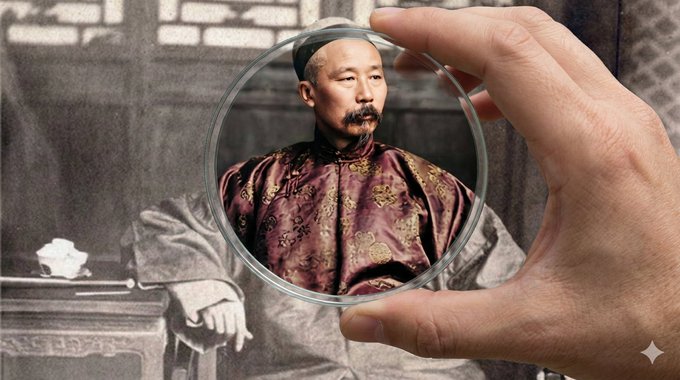
Đối với ảnh được cung cấp, tạo hình ảnh dựa trên từ gợi ý, bộ lọc sử dụng bộ lọc lớn, trình bày bằng màu sắc. { "type": "augmented_reality_filter_synthesis", "aspect_ratio": "16:9", "instruction": "CRITICAL: This is an IMAGE-TO-IMAGE task, not a text-to-image generation. You must strictly preserve the pixels of the {{UPLOADED_IMAGE_FILE}} as the background. Do not generate a new scene based on description. Only the area INSIDE the glass filter is allowed to change.", "global_constraints": { "source_fidelity": "The background outside the filter must be an EXACT pixel-match to {{UPLOADED_IMAGE_FILE}}. Do not alter, crop, expand, or 'reimagine' the background context.", "context_isolation": "Ignore all previous images or conversation topics. Focus EXCLUSIVELY on the current uploaded file.", "modification_scope": "modifications are STRICTLY limited to the area inside the glass filter lens." }, "dynamic_analysis_module": { "step_1_focal_point_extraction": { "task": "Identify the coordinates of the main subject (Face/Object) in the current file to position the filter.", "output_variable": "[TARGET_COORDINATES]", "logic": "Find the center of interest solely within the provided image." }, "step_2_filter_specs": { "task": "Determine filter parameters based on the subject.", "output_variable_shape": "[FILTER_SHAPE]", "output_variable_style": "[HD_RESTORATION_STYLE]", "logic": "Face -> Circular/Oval + Skin Restoration. Building -> Rectangular + Structure Sharpening." } }, "system_prompt_logic": { "main_premise": "A first-person view of a hand holding a [FILTER_SHAPE] glass lens over the actual physical print of {{UPLOADED_IMAGE_FILE}}.", "layer_definition_logic": { "layer_1_background_immutable": { "z_index": "Background (The Original Image)", "content": "The original {{UPLOADED_IMAGE_FILE}} displayed as a large physical print or wall projection.", "strict_rules": { "NO_GENERATION": "Do not generate new scenery. Use the uploaded image as a fixed texture map.", "NO_EXPANSION": "Do not attempt to extend the image borders. Show the image exactly as provided, framing it to fill the background.", "visual_state": "Must retain all original artifacts: noise, blur, scratches, B&W tone, and low resolution. This is the 'Before' state." } }, "layer_2_foreground_hand": { "z_index": "Foreground (Overlay)", "content": "A realistic human hand holding a [FILTER_SHAPE] optical glass lens.", "positioning": "The hand enters from the edge (unobtrusive). The glass lens is positioned directly over [TARGET_COORDINATES].", "lighting": "The hand casts a subtle shadow onto the background print to create depth." }, "layer_3_filter_throughput": { "z_index": "Lens Interior (The Transformation)", "content": "The specific pixels visible *through* the glass lens.", "visual_transformation": { "action": "Upscale and colorize ONLY the pixels inside the lens boundary.", "style": "[HD_RESTORATION_STYLE] (4K resolution, realistic textures, vibrant lighting).", "contrast_lock": "The separation is absolute. Outside the line = Old/Blurry. Inside the line = New/Sharp. No fading gradients." } } } } }
Bạn cũng có thể thích
View all





Câu hỏi thường gặp
Prompt "Bộ lọc xuyên thời gian - Phục chữ ảnh cũ" dùng để làm gì?
Prompt architecture này được thiết kế cho tạo ảnh bằng AI. Nó giúp tạo ra kết quả theo phong cách architecture và được tối ưu cho Nano banana pro.
Tôi sử dụng prompt này như thế nào?
Sao chép prompt rồi dán vào công cụ tạo ảnh AI bạn đang dùng. Bạn có thể điều chỉnh tỷ lệ khung hình, phong cách hoặc negative prompt để tinh chỉnh kết quả.
Những công cụ AI nào phù hợp nhất với prompt architecture này?
Prompt này được tối ưu riêng cho Nano banana pro, nhưng cũng hoạt động tốt với các công cụ image phổ biến khác.
Tôi có thể chỉnh sửa prompt này không?
Có. Bạn có thể điều chỉnh prompt theo định hướng sáng tạo của mình, thêm hoặc bớt yếu tố, tinh chỉnh mô tả phong cách hoặc kết hợp với các prompt khác để tạo ra kết quả độc đáo.