4,217 views245 copies
0Prompt
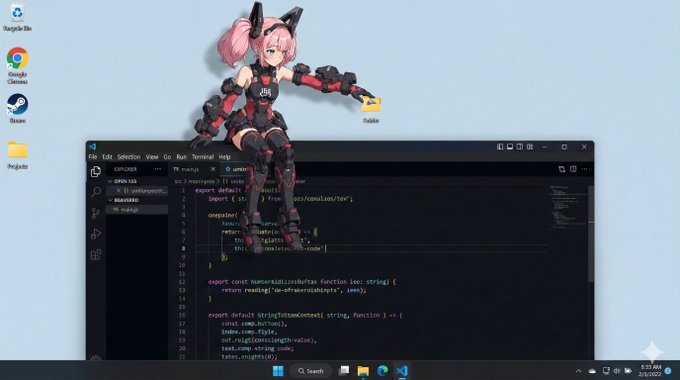
os_environment: - Choose one: "Windows 11 style desktop" or "macOS Sonoma style desktop" - If not specified, let the model choose the most natural OS UI - Use authentic UI elements based on the selected OS subject: - A character based on reference image A - Rendered with semi-3D, anime-style shading - Clear solid shadows and highlights defining volume - Appears as a desktop mascot overlay interacting with real OS UI composition: - A realistic computer desktop in 16:9 aspect ratio - Include authentic-looking application windows and icons - Character positioned naturally on or around these UI elements action: - Allow the model to freely choose mascot-like behaviors such as: - lying across the top edge of a window - sitting on a window frame - touching, inspecting, or reacting to icons - peeking from behind folders or apps - Actions should feel physically grounded and slightly playful location: - Displayed on a real OS-style desktop (Windows/macOS) - Show recognizable UI elements (e.g., Chrome window, folder icons, taskbar/dock) - Icons and windows appear authentic but used only as background elements style: - Semi-3D anime shading (soft cel-shaded look) - Defined shadows instead of rim lighting - Clean digital rendering that blends naturally with real desktop UI camera_lighting: - Neutral frontal or top lighting to create solid, directional shadows - Soft ambient light to keep color harmony with the desktop - Screenshot-like straight-on camera angle colors: - Desktop in cool OS-like tones - Character colors follow reference A accurately - Shadows emphasized for 3D volume text: - None unless needed edit_instructions: - Use reference A for character accuracy - Emphasize 3D-like volume with clear shadow planes - Ensure the character appears layered above real desktop UI elements - Keep real UI assets unmodified and only as contextual background references: A: "Character appearance reference" extras: - high resolution - realistic OS UI rendering - clean compositing and precise layer separation - allow creative mascot-like movement
About this prompt
os_environment: - เลือกหนึ่ง: "เดสก์ท็อปสไตล์ Windows 11" หรือ "เดสก์ท็อปสไตล์ macOS Sonoma" - หากไม่ระบุ: ให้โมเดลเลือก UI ของระบบปฏิบัติการที่ดูเป็นธรรมชาติที่สุด - ใช้องค์ประกอบ UI แบบแท้จริง: ใช้องค์ประกอบ UI จริงตามระบบปฏิบัติการที่เลือก subject: - ตัวละครตามรูปอ้างอิง A - เรนเดอร์สไตล์กึ่ง 3D แอนิเมชัน - กำหนดปริมาตรด้วยเงาและไฮไลต์สีทึบชัดเจน - แสดงเป็นมาสคอตเดสก์ท็อปที่โต้ตอบกับ UI ของระบบปฏิบัติการจริง composition: - เดสก์ท็อปคอมพิวเตอร์จริงสัดส่วน 16:9 - มีหน้าต่างแอปพลิเคชันและไอคอนที่ดูสมจริง - ตัวละครอยู่เหนือหรือรอบๆ องค์ประกอบ UI เหล่านี้อย่างเป็นธรรมชาติ action: - อนุญาตให้โมเดลเลือกพฤติกรรมคล้ายมาสคอตได้อย่างอิสระ เช่น: - นอนพาดบนขอบบนของหน้าต่าง - นั่งบนกรอบหน้าต่าง - สัมผัส ตรวจดู หรือตอบสนองต่อไอคอน - โผล่หัวจากหลังโฟลเดอร์หรือแอปพลิเคชัน - การกระทำควรรู้สึกมีน้ำหนักทางกายภาพและขี้เล่นเล็กน้อย location: - แสดงบนเดสก์ท็อปสไตล์ระบบปฏิบัติการจริง (Windows/macOS) - แสดงองค์ประกอบ UI ที่จดจำได้ (เช่น หน้าต่าง Chrome, ไอคอนโฟลเดอร์, ทาสก์บาร์/ด็อก) - ไอคอนและหน้าต่างดูสมจริง แต่ใช้เป็นเพียงองค์ประกอบพื้นหลัง style: - เรนเดอร์แอนิเมชันกึ่ง 3D (รูปลักษณ์เซลล์เชดนุ่มนวล) - เงาที่กำหนดขอบเขตชัดเจน แทนที่แสงขอบ - เรนเดอร์ดิจิทัลที่สะอาดตา ผสานกับ UI เดสก์ท็อปจริงอย่างเป็นธรรมชาติ camera_lighting: - แสงส่องจากด้านหน้าหรือด้านบนแบบกลาง เพื่อสร้างเงาทึบมีทิศทาง - แสงแวดล้อมอ่อนนุ่ม รักษาความกลมกลืนสีกับเดสก์ท็อป - มุมกล้องระดับสายตาเหมือนภาพหน้าจอ colors: - เดสก์ท็อปใช้โทนสีเย็นสไตล์ OS - สีตัวละครตรงตามรูปอ้างอิง A อย่างแม่นยำ - เน้นเงาเพื่อแสดงปริมาตรแบบ 3D text: - ไม่มี ยกเว้นจำเป็น edit_instructions: - ใช้รูปอ้างอิง A เพื่อความถูกต้องของตัวละคร - เน้นปริมาตรกึ่ง 3D ด้วยระนาบเงาที่ชัดเจน - ตรวจสอบให้ตัวละครดูเหมือนซ้อนทับบนองค์ประกอบ UI เดสก์ท็อปจริง - รักษาแหล่งข้อมูล UI จริงไว้ไม่แก้ไข ใช้เป็นเพียงพื้นหลังบริบท references: A: "อ้างอิงรูปลักษณ์ตัวละคร" extras: - ความละเอียดสูง - เรนเดอร์ UI ระบบปฏิบัติการสมจริง - คอมโพสิตสะอาดตาและการแยกเลเยอร์ที่แม่นยำ - อนุญาตการเคลื่อนไหวสร้างสรรค์แบบมาสคอต
คุณอาจชอบสิ่งนี้ด้วย
View all





คำถามที่พบบ่อย
พรอมต์ "มาสคอตนั่งบนขอบหน้าต่างระบบปฏิบัติการ" ใช้สำหรับอะไร?
พรอมต์หมวด character นี้เหมาะสำหรับการสร้างภาพด้วย AI ช่วยสร้างผลลัพธ์สไตล์ character และถูกปรับให้เหมาะกับ Nano banana pro
ฉันควรใช้พรอมต์นี้อย่างไร?
คัดลอกพรอมต์แล้วนำไปวางในเครื่องมือสร้างภาพ AI ที่คุณใช้งานอยู่ จากนั้นสามารถปรับอัตราส่วนภาพ สไตล์ หรือเนกาทีฟพรอมต์เพื่อเกลาผลลัพธ์ได้
เครื่องมือ AI ใดเหมาะกับพรอมต์ character นี้มากที่สุด?
พรอมต์นี้ถูกปรับให้เหมาะกับ Nano banana pro โดยเฉพาะ แต่ก็ยังใช้งานได้ดีกับเครื่องมือimageยอดนิยมอื่น ๆ
ฉันสามารถปรับแก้พรอมต์นี้ได้ไหม?
ได้ คุณสามารถปรับพรอมต์ให้เข้ากับทิศทางงานสร้างสรรค์ของคุณ เพิ่มหรือลดองค์ประกอบ ปรับคำอธิบายสไตล์ หรือผสมกับพรอมต์อื่นเพื่อให้ได้ผลลัพธ์ที่แตกต่างยิ่งขึ้น