697 views286 copies
0Prompt
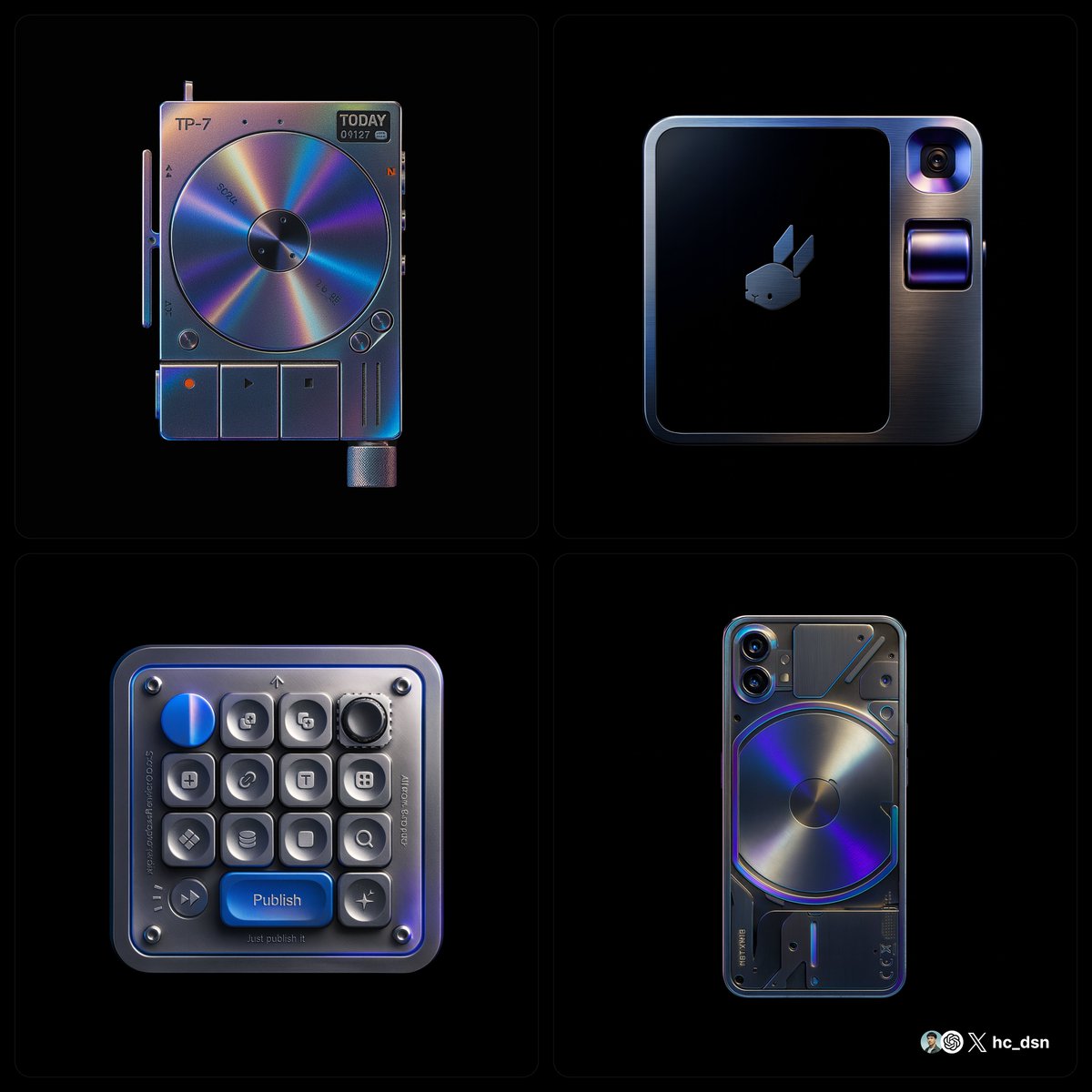
create image with 1:1 ratio retexture the photo I attached with the following json { "style_name": "hermes_subtle_specular_gradient", "background": { "type": "solid", "color": "#000000", "light_reflection": "none" }, "base_material": { "type": "polished_metal", "color": "#B0B0B0", "finish": "glossy", "reflectivity": 0.75, "surface_variation": { "micro_noise": 0.005, "brushed_direction": "none" } }, "highlight_strategy": { "mode": "localized_specular_enhancement", "trigger": "light-facing curved planes and direct lit faces", "color_gradient": ["#121A28", "#3D4C6B", "#8c71b7", "#4d21cd"], "gradient_type": "fluid_blend", "intensity_curve": "ease-out from highlight center", "falloff": 0.8, "blend_mode": "soft_light", "saturation_level": 0.4, "coverage_ratio": 0.2, "transition_smoothness": 0.95 }, "lighting": { "scene_type": "high-control studio", "key_light": { "intensity": 1.0, "color": "#FFFFFF", "angle": "35° above and side", "softness": 0.6 }, "fill_light": { "enabled": false }, "rim_light": { "enabled": false }, "reflection_behavior": { "mirrored_zones": "limited to high exposure zones", "glow_color": "applied from gradient with low saturation" } }, "specular_color_behavior": { "base_surface": "metallic neutral", "highlight_zones": "low-saturation chromatic reflection", "edge_bleed": "minimal", "inner_glow": 0.1 }, "detail_features": { "engraved_elements": { "type": "precise deboss", "lighting_response": "low bounce", "shadow_edge": "#222222", "rim_light_tint": "#888888" } }, "application_targets": [ "object product photography", "3D icons with selective lighting", "branding renders", "luxury UI component styling" ], "visual_effect_notes": { "mood": "understated luxury, technical precision, controlled emotion", "realism": "stylized physical logic", "focus": "refined colored specular only on light-facing curved surfaces with fluid-like gradient transitions" } }
About this prompt
Creëer een afbeelding in een 1:1 verhouding Ik gebruik de volgende json om mijn bijgevoegde foto opnieuw te textureren { “style_name”: “hermes_subtle_specular_gradient”, “background”: { “type”: “solid”, “color”: “#000000”, “light_reflection”: “none” }, “base_material”: { “type”: “polished_metal”, “color”: “#B0B0B0”, “finish”: “glossy”, “reflectivity”: 0.75, “surface_variation”: { “micro_noise”: 0.005, “brushed_direction”: “none” } }, “highlight_strategy”: { “mode”: “localized_specular_enhancement”, “trigger”: “naar licht gerichte oppervlakken en direct verlichte vlakken”, “color_gradient”: [“#121A28”, “#3D4C6B”, “#8c71b7”, “#4d21cd”], “gradient_type”: “fluid_blend”, “intensity_curve”: “uitvloeiend vanuit het hooglichtcentrum”, “verval”: 0.8, “blend_mode”: “soft_light”, “saturation_level”: 0.4, “coverage_ratio”: 0.2, “transition_smoothness”: 0.95 }, “lighting”: { “scene_type”: “high-control studio”, “key_light”: { “intensity”:1.0, “color”: “#FFFFFF”, “angle”: “bovenkant 35°”, “zachtheid”: 0.6 }, “fill_light”: { “enabled”: false }, “rim_light”: { “enabled”: false }, “reflection_behavior”: { “mirrored_zones”: “beperkt tot hoge belichtingsgebieden”, “glow_color”: “toegepast vanuit een laagverzadigd verloop” } }, “specular_color_behavior”: { “base_surface”: “metaal neutraal”, “highlight_zones”: “laagverzadigde chroma reflectie”, “edge_bleed”: “minimal”, “inner_glow”: 0.1 }, “detail_features”: { “engraved_elements”: { “type”: “precisie ingekerfd”, “lighting_response”: “lage reflectie”, “shadow_edge”: “#222222”, “rim_light_tint”: “#888888” } }, “application_targets”: [ “object productfotografie”, “3D iconen met selectieve verlichting”, “merkweergave”, “luxe UI componentstijl” ], “visual_effect_notes”: { “mood”: “discrete luxe, technische precisie, gecontroleerde emotie”, “realism”: “gestileerde fysieke logica”, “focus”: “optimaliseer gekleurde spiegelende reflecties alleen op naar licht gerichte oppervlakken met vloeiende overgangen” } }
Misschien vind je dit ook leuk
View all





Veelgestelde vragen
Waarvoor wordt de prompt "Vloeibaar metaal ontwerpproducten" gebruikt?
Deze branding-prompt is bedoeld voor AI-beeldgeneratie. Hij helpt resultaten in branding-stijl te maken en is geoptimaliseerd voor nano-banana-pro.
Hoe gebruik ik deze prompt?
Kopieer de prompt en plak deze in je favoriete AI-beeldgenerator. Je kunt instellingen zoals beeldverhouding, stijl of negatieve prompts aanpassen om het resultaat te verfijnen.
Welke AI-tools werken het best met deze branding-prompt?
Deze prompt is specifiek geoptimaliseerd voor nano-banana-pro, maar werkt ook goed met andere populaire image-tools.
Kan ik deze prompt aanpassen?
Ja. Je kunt de prompt aanpassen aan je creatieve richting, elementen toevoegen of verwijderen, stijlbeschrijvingen verfijnen of hem combineren met andere prompts voor unieke resultaten.