186 views36 copies
0Prompt
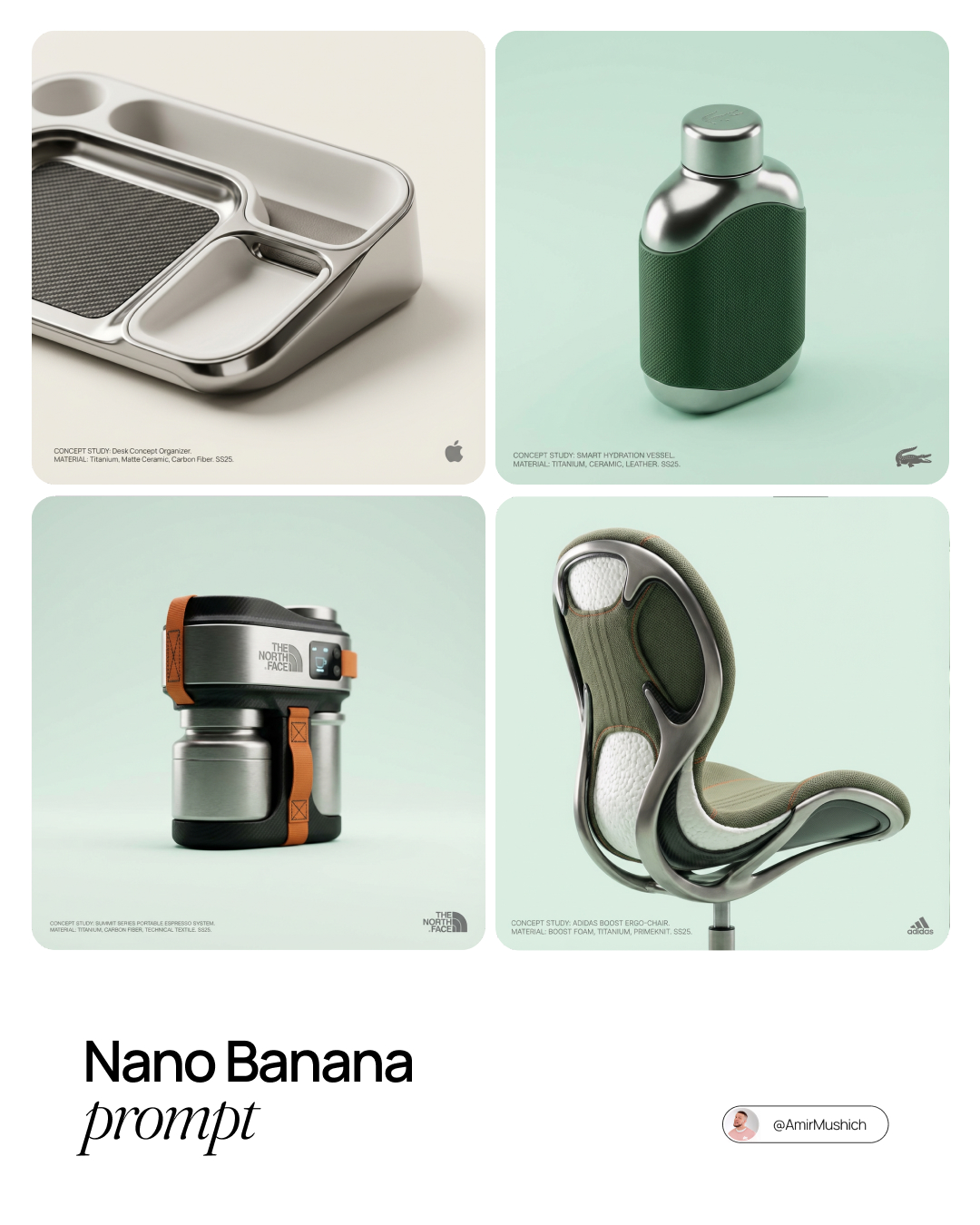
[BRAND NAME]: A high-end, glossy concept art magazine editorial photograph of a unique, unexpected functional object conceptualized and designed by the brand. **1. The Concept & Object (AI Invention):** Based on the design philosophy, heritage, and material vocabulary of the specified brand, the AI must invent a novel utility product (NOT standard clothing, shoes, or bags). Examples could be home goods, tech accessories, tools, or sporting equipment, reinterpretated through the brand's lens. The object should feel sculptural yet functional. **2. Materials & Details (Hyper-Premium):** The object is constructed from ultra-premium, highly tactile materials characteristic of the brand (e.g., patinated exotic leathers, brushed aerospace-grade titanium, sculpted matte ceramics, molded carbon fiber, or technical high-fashion textiles). Every detail is hyper-realistic: visible stitching, microscopic material grain, precision engravings, and complex texture contrasts. **3. Photography & Lighting (Cinematic Studio):** Shot on a medium format Phase One camera with a 100mm macro lens. Extremely shallow depth of field, with sharp focus on the hero details of the object and a creamy, smooth bokeh background. The lighting is sophisticated studio softbox lighting: gentle, enveloping fill light with precise rim lighting to accentuate contours and material textures. **4. Environment:** A seamless, impeccably clean studio cyclorama background in a pure, ultra-light pastel tone (e.g., desaturated mint, pale blush, or off-white), free of shadows. **5. Layout & UI Elements (Strict Placement):** - **Bottom Right Corner:** A small, understated, monochrome gray logo of the brand. - **Bottom Left Corner:** Small, minimalist monochrome gray text describing the invented product. The font style looks like Manrope Regular with very tight tracking (kerning) and balanced line spacing. Example format: "CONCEPT STUDY: [AI inserts invented product name]. MATERIAL: [AI inserts main materials]. SS25."
About this prompt
[ブランド名]: これは、高級で洗練されたコンセプトアートマガジンの編集写真であり、ブランドが構想しデザインしたユニークで意外な機能性アイテムを紹介しています。 ** 1.コンセプトとオブジェクト(AI発明) :** 指定されたブランドのデザイン哲学、歴史的遺産、素材の語彙に基づき、AIは新規の実用的な製品(標準的な衣類、靴、バッグではない)を創造しなければなりません。製品例としては、家庭用品、テクノロジーアクセサリー、ツール、スポーツ用品などがあり、ブランドの視点で再解釈されたものです。製品は彫刻的でありながら実用的な機能を兼ね備えているべきです。 ** 2. 素材とディテール(超高級) :** この製品は、ブランドを象徴する超高級で優れた触感の素材(例:経年変化した希少レザー、ブラシ仕上げの航空機グレードチタン、彫刻的なマットセラミック、成形カーボンファイバー、ハイテクファッションファブリック)で作られています。すべてのディテールはリアルさを追求:明確に見えるステッチ、微細な素材テクスチャー、精密な彫刻、複雑な質感のコントラスト。 ** 3. 撮影と照明(映画スタジオ) :** Phase One 中判カメラと100mmマクロレンズで撮影。被写界深度は非常に浅く、被写体のディテールはクリアでシャープ、背景は柔らかく繊細なボケ味。照明はプロフェッショナルなスタジオソフトボックスを使用:柔らかい周囲光と、物体の輪郭と素材テクスチャーを強調する精密なリムライト。 ** 4. 環境:** シームレスで非の打ちどころのない清潔なスタジオシクロラマ背景、純粋で非常に薄いパステルカラー(例:褪せたミントグリーン、淡いブラッシュ、グレイッシュホワイト)で、影はありません。 ** 5. レイアウトとUI要素(厳密な配置) :** - **右下:** ブランドの小さく控えめなモノクログレーのロゴ。 - **左下:** 発明された製品を説明する簡潔なモノクログレーの小さな文字。フォントスタイルはManrope Regularに類似、非常にタイトな文字間隔(カーニング)、均等な行間。例のフォーマット:「コンセプトスタディ:[AIが発明製品名を挿入]。素材:[AIが主要素材を挿入]。2025年春夏。」
こちらもおすすめ
View all





よくある質問
「コンセプトアート雑誌の編集写真」のプロンプトは何に使いますか?
このbrandingプロンプトはAI画像生成向けです。branding系の結果を作るのに役立ち、Nano banana pro向けに最適化されています。
このプロンプトはどう使いますか?
プロンプトをコピーして、利用しているAI画像生成ツールに貼り付けてください。アスペクト比、スタイル、ネガティブプロンプトなどを調整して結果を詰められます。
このbrandingプロンプトに最適なAIツールは何ですか?
このプロンプトは Nano banana pro 向けに最適化されていますが、他の主要なimageツールでも十分に機能します。
このプロンプトは編集できますか?
はい。自分の制作方針に合わせて、要素の追加・削除、スタイル記述の調整、他のプロンプトとの組み合わせなどを行えます。