2,235 views89 copies
0Prompt
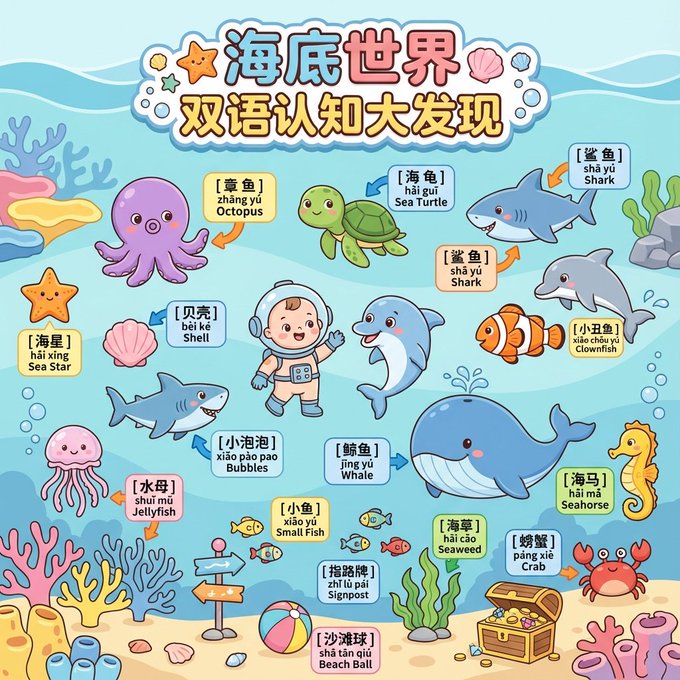
[SCENE_THEME] = Underwater World [TARGET_AGE] = 2–5 years old Generate a publishable-grade children's cognitive "Flat Q-version Cartoon" panoramic long image of an underwater world (Vertical A4 Panoramic Flat Cute Cartoon). Overall art style: thick lines, rounded shapes, bright yet soft colors, safe style with no sharp corners, large blocks of shapes, high contrast, simplified cartoon graphics suitable for toddler cognition. The image must be clean, clear, logical, with distinct object boundaries. Resolution is ultra-clear 8K. # 一、Title Area (Top Banner) Add a large title at the top: "Underwater World Bilingual Cognitive Discovery". Font: Extra-large rounded cartoon font (plump, colorful, soft shadow). Add cute cartoon marine icons on both sides (mini starfish, small shells, small bubbles). # 二、Main Scene (Main Panorama) Composition: Ultra-wide flat cartoon underwater scene. Foreground and midground should be as clear as possible; avoid complex depth of field; maintain simple, clean, child-friendly zoning. The overall feel should resemble an "underwater amusement park map". Element Requirements: - All marine creatures are big-headed Q-version cartoons - Thick lines, soft edges - Vivid colors, clear contrast - Simple structure, easy for children to recognize shapes Include 1–2 guide characters (Q-version diving baby / little dolphin companion), using exaggerated movements to guide the viewer's gaze. # 三、Cognitive Object List (Core Objects) All objects must be: rounded, flat, cartoonish, large-blocked, easily recognizable. 【Core Large Objects (5–8)】 Octopus Sea Turtle Shark Dolphin Clownfish Whale Seahorse Crab 【Medium & Small Objects (8–12)】 Starfish Shell Jellyfish Coral Small Bubble Clusters Small Fish (multicolored) Seaweed Beach Ball Treasure Chest Underwater Signpost 【Environmental Elements (unlimited)】 Simplified waves, flat coral clusters, light-colored seabed sand, shell fragments, bubble trails, Q-version rocks. # 四、Bilingual Labeling System (Bilingual Labeling System) Add three-line label cards for all main cognitive objects (flat rounded rectangle, soft-colored background, simple cartoon style). Fixed format: First line: Chinese (extra-bold rounded font) Second line: Pinyin with tone marks Third line: English (rounded sans-serif) Example: [ 章 鱼 ] [ zhāng yú ] [ Octopus ] Label color: Light cream yellow or light blue Font: Clear, bold, easy to read Place labels in blank areas near the objects. # 五、Indicator Arrows (Flat Cute Arrow) Use flat cartoon style arrows: - Thick lines, rounded ends - Eye-catching colors (orange / blue) - One end connects to the label, the other end is close to the object boundary - Avoid arrow crossings, maintain overall neatness and order. # 六、Style Consolidation (Unified Output) Flat Cute Cartoon Style; Bright & Soft Color Palette; Round Shapes & Child-safe Edges; Clean Separation of Elements; Bilingual Labels + Clear Arrows; 8K Ultra HD; Simple, Fun, Easy-to-read Composition.
You may also like
View all





Frequently Asked Questions
What is the "Bilingual Cognitive Discovery - Underwater World" prompt used for?
This cartoon prompt is designed for AI image generation. It helps create cartoon results and is optimized for Nano banana pro.
How do I use this prompt?
Simply copy the prompt, then paste it into your preferred AI image generation tool. You can customize settings like aspect ratio, style, or negative prompts to refine the result.
Which AI tools work best with this cartoon prompt?
This prompt is specifically optimized for Nano banana pro, but it also works well with other popular image tools.
Can I modify this prompt?
Absolutely. You can customize the prompt to match your creative direction, add or remove elements, refine style descriptors, or combine it with other prompts for unique results.