3,167 views77 copies
0Prompt
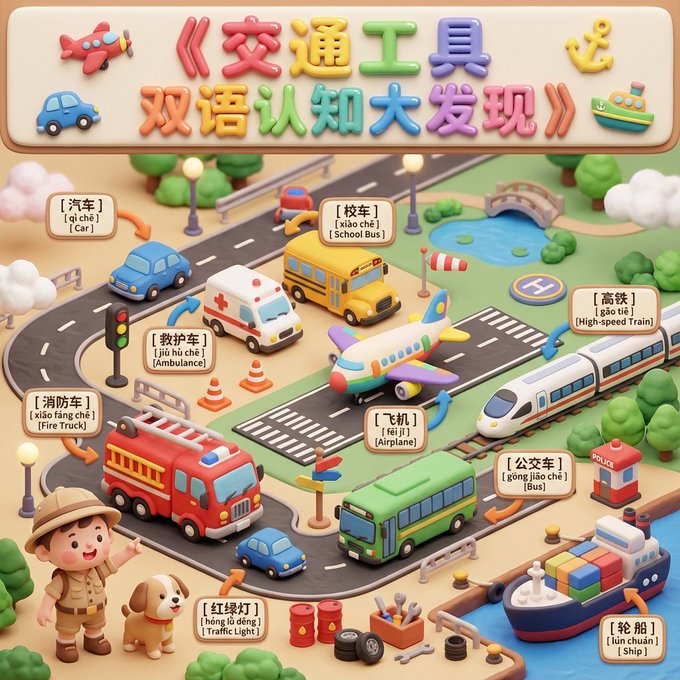
[SCENE_THEME] = Vehicles [TARGET_AGE] = 2–5 years old Generate a publishable-grade children's cognitive "Vertical A4 Panoramic Claymation Diorama". Visual style: Soft and cute clay 3D, rounded, safe, macaron + Morandi colors, abundant soft light and volumetric light, unified material, 8K Ultra HD, Cinema 4D cute rendering. # 一、Title Area (Top Banner) At the very top, add a large title: "Vehicles Bilingual Cognitive Discovery". Use extra-large, chubby clay balloon letters (colorful + highlights). Place cute small vehicle clay reliefs on both sides (mini airplane, mini car, mini anchor, etc.). # 二、Main Scene (Main Diorama) Composition: Wide-angle miniature diorama perspective. Keep foreground and midground in full focus; background slightly blurred; arrange according to "grouped layout + breathing space". Scene style: Like a large "vehicle park toy diorama", with roads, tracks, airport runways, small harbors, etc., on the ground. Include 1–2 guide characters (explorer baby / clay puppy / mini robot), performing pointing and excited actions to guide children in exploring the vehicles. # 三、Cognitive Object List (Core Objects) All objects must be rounded, without sharp corners, and have a clay texture. 【Core Large Items (5–8)】 Place in main areas: Car Ambulance School Bus Fire Truck Airplane High-Speed Rail Bus Ship 【Medium & Small Items (8–12)】 Scatter around large items: Traffic Light Traffic Cone Direction Sign Road Barrier Oil Drum Small Tire Small Screw Tools Traffic Booth Weather Vane Small Helipad Marker 【Environmental Elements (unlimited quantity)】 Soft clay roads Chubby lampposts Marshmallow clouds Clay bushes Small lakes Small bridge Mini airport runway stripes # 四、Bilingual Labeling System (Bilingual Labeling System) Add three-line soft label tags (rounded corners, thick edges, light relief) for all vehicles requiring cognition, with a creamy white or light yellow background. Fixed format: First line: Chinese (extra bold rounded font) Second line: Pinyin with tone marks Third line: English (rounded sans-serif) Example: [ 汽 车 ] [ qì chē ] [ Car ] # 五、Precise Arrows (3D Clay Arrow) Use thick, rounded 3D clay arrows (orange-yellow or pink-blue). One end attaches to the label tag, the other end precisely points to the corresponding vehicle. Arrow crossing is prohibited. Place label tags in the nearest blank area to the object, ensuring the image is clear and orderly. # 六、Style Consolidation (Unified Model Output) Wide Panoramic Claymation Diorama; Soft Pastel Colors; Round & Child-safe Edges; Rich but Organized Composition; Precise Clay Arrows + Bilingual Labels; 8K Ultra HD; Soft Volumetric Lighting; Cinema 4D cute render style
You may also like
View all





Frequently Asked Questions
What is the "Bilingual Cognitive Discovery - Vehicles" prompt used for?
This character prompt is designed for AI image generation. It helps create character results and is optimized for Nano banana pro.
How do I use this prompt?
Simply copy the prompt, then paste it into your preferred AI image generation tool. You can customize settings like aspect ratio, style, or negative prompts to refine the result.
Which AI tools work best with this character prompt?
This prompt is specifically optimized for Nano banana pro, but it also works well with other popular image tools.
Can I modify this prompt?
Absolutely. You can customize the prompt to match your creative direction, add or remove elements, refine style descriptors, or combine it with other prompts for unique results.