1,724 views236 copies
0Prompt
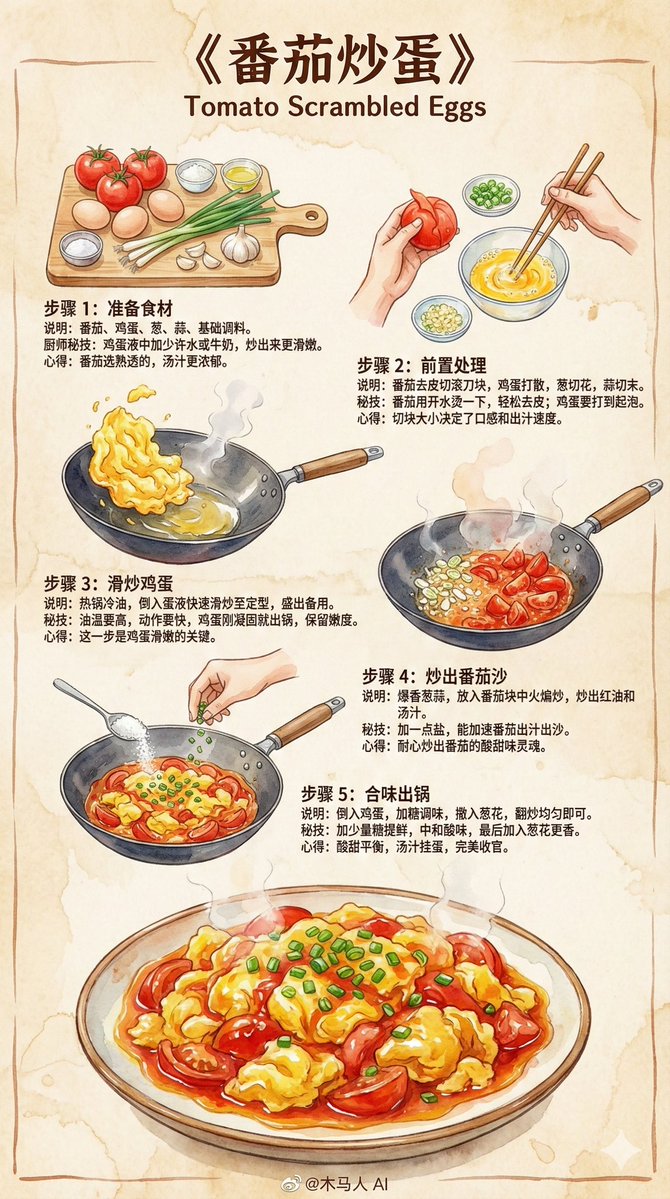
Create a 9:16 vertical "Scrambled Eggs with Tomatoes" hand-drawn style instructional recipe infographic. Overall style requirements: • An instructional recipe written by a professional chef for ordinary people • Use Z-shaped dynamic layout (top left → top right → bottom left) for smooth reading • Colored marker sketch style, paired with delicate ink outlines • Adopt 2025 mainstream illustration color schemes and brushstrokes • Beige paper texture background, warm, rustic, and friendly • The illustrations must make people "want to cook after seeing them" ⸻ Content structure (General) 1. Top title (Eye-catching) 《{Dish Name}》 ⸻ 2. Step blocks (Z-shaped dynamic layout, 3–5 steps) Each step includes: • Hand-drawn step illustration (colored markers + ink lines) • Brief graphic and text description • Chef's secret tip • Small insight or reminder ⸻ Step template (General, can be automatically filled by the model) Step 1: Prepare ingredients (Automatically generates relevant ingredients based on the dish name) Illustration: Neatly arranged main ingredients and seasonings. Description: List and process the basic materials for the dish. Secret tip: Tell the user how to enhance flavor or texture. Insight: Provide simple experience or reminder. ⸻ Step 2: Seasoning / Marinating / Pre-processing Illustration: Scene of mixing sauce, marinating meat, or processing main ingredients in a small bowl or on a cutting board. Description: Show key foundational steps. Secret tip: Proportions, small tricks, points to avoid failure. Insight: Light-hearted style small tip. ⸻ Step 3: Stir-frying / Key cooking step Illustration: Cooking scene of ingredients in a wok, with soft watercolor steam. Description: High heat, low heat, sequence, important actions. Secret tip: Methods to maintain heat, control time, and enhance aroma. Insight: Emphasize the soul of the dish. ⸻ Step 4: Combining flavors / Final step before serving Illustration: Scene of adding sauce, seasoning, and mixing ingredients. Description: Overall sauce reduction, proper seasoning. Secret tip: Small tricks for glossy oil, maintaining texture or aroma. Insight: This step determines success or failure. ⸻ Step 5: Garnishing / Finishing step Illustration: Actions like sprinkling spices, adding nuts, or plating. Description: Final flavor adjustment or plating. Secret tip: Techniques to maintain crispness, avoid overcooking, etc. Insight: Description of the finished dish's flavor. ⸻ Bottom finished dish illustration • A refined, visually and aromatically appealing "Scrambled Eggs with Tomatoes" • Strong watercolor texture, glossy, tender, and tempting • Make the reader want to cook after seeing it ⸻ Bottom center signature @Wooden Horse Man AI
You may also like
View all





Frequently Asked Questions
What is the "Recipe - Scrambled Eggs with Tomatoes" prompt used for?
This food prompt is designed for AI image generation. It helps create food results and is optimized for Nano banana pro.
How do I use this prompt?
Simply copy the prompt, then paste it into your preferred AI image generation tool. You can customize settings like aspect ratio, style, or negative prompts to refine the result.
Which AI tools work best with this food prompt?
This prompt is specifically optimized for Nano banana pro, but it also works well with other popular image tools.
Can I modify this prompt?
Absolutely. You can customize the prompt to match your creative direction, add or remove elements, refine style descriptors, or combine it with other prompts for unique results.