3,323 views69 copies
0Prompt
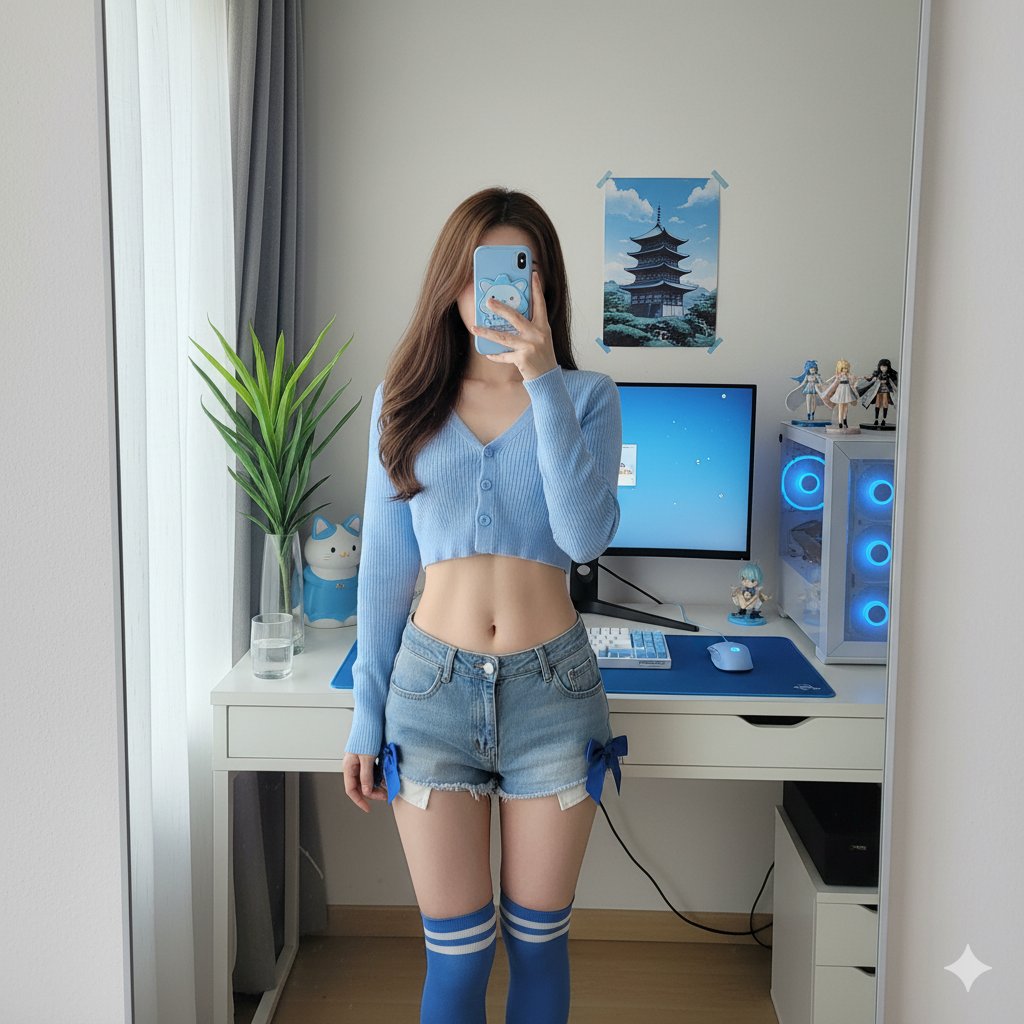
### **Scene** Mirror selfie, otaku computer corner, blue tone --- ### **Subject** * **Gender Expression**: Female * **Age Range**: Around 25 years old * **Ethnicity**: East Asian * **Body Type**: Slim, defined waistline; natural body proportions * **Skin Tone**: Light neutral tone * **Hair**: * **Length**: Waist-length long hair * **Style**: Straight hair, slightly curled ends * **Color**: Medium brown * **Pose**: * **Standing Posture**: Standing, slight contrapposto stance * **Right Hand**: Holding a phone to block the face (identity obscured) * **Left Arm**: Naturally hanging down beside the torso * **Torso**: Body leaning back slightly; waist and abdomen exposed * **Attire**: * **Top**: Light blue short knitted cardigan, top two buttons fastened; faintly visible blue French-style underwear * **Bottom**: Denim shorts, with a blue satin ribbon bow on each side of the hips * **Socks**: Blue and white horizontal striped knee-high socks * **Accessory**: Blue cute mascot phone case --- ### **Environment** * **Description**: Bedroom computer corner as seen from a wall-mounted mirror * **Furnishings**: * White desk * Single monitor, displaying a soft blue wallpaper (no readable text) * Mechanical keyboard with white keycaps, placed on a blue desk mat * Mouse, placed on a small blue mouse pad * PC case on the right side, with blue case lighting * Three anime figurines on or near the PC case * A pagoda poster on the wall * Cat-shaped desk lamp with blue accents * A clear glass of water * A tall leafy green plant by the window (left side of the frame) * **Color Replacement**: Replace all original pink elements (clothing and room) with blue (baby blue -> sky blue/periwinkle blue). --- ### **Lighting** * **Light Source**: Daylight from a large window on the left side of the frame, filtered through sheer curtains * **Light Quality**: Soft, diffused light * **White Balance (K)**: 5200 --- ### **Camera** * **Mode**: Smartphone rear camera shot through a mirror (no portrait/bokeh mode) * **Equivalent Focal Length (mm)**: 26 * **Distance (meters)**: * Subject to mirror: 0.6 * Camera to mirror: 0.5 * **Exposure**: * **Aperture (f)**: 1.8 * **ISO**: 100 * **Shutter Speed (seconds)**: 0.01 * **Exposure Compensation (EV)**: -0.3 * **Focus**: Focus on the torso and shorts of the mirror image * **Depth of Field**: Natural smartphone depth of field (deep depth of field); background is clearly discernible, no artificial blur * **Composition**: * **Aspect Ratio**: 1:1 * **Cropping**: From the top of the head to mid-thigh; frame includes the desk, monitor, PC case, and plant * **Angle**: Slight high-angle shot from the mirror's perspective * **Composition Note**: Keep the subject centered; to avoid wide-angle edge distortion, stand farther back and then crop to a square --- ### **Negative Prompts** * Pink/magenta appearing anywhere * Beauty filter/skin smoothing; poreless appearance * Exaggerated or distorted human anatomy * NSFW, see-through fabric, wardrobe malfunction * Logos, brand names, readable UI text * Fake portrait mode blur, CGI/illustration feel
You may also like
View all





Frequently Asked Questions
What is the "Girl's Mirror Selfie" prompt used for?
This branding prompt is designed for AI image generation. It helps create branding results and is optimized for nano-banana-pro.
How do I use this prompt?
Simply copy the prompt, then paste it into your preferred AI image generation tool. You can customize settings like aspect ratio, style, or negative prompts to refine the result.
Which AI tools work best with this branding prompt?
This prompt is specifically optimized for nano-banana-pro, but it also works well with other popular image tools.
Can I modify this prompt?
Absolutely. You can customize the prompt to match your creative direction, add or remove elements, refine style descriptors, or combine it with other prompts for unique results.