3,002 views399 copies
0Prompt
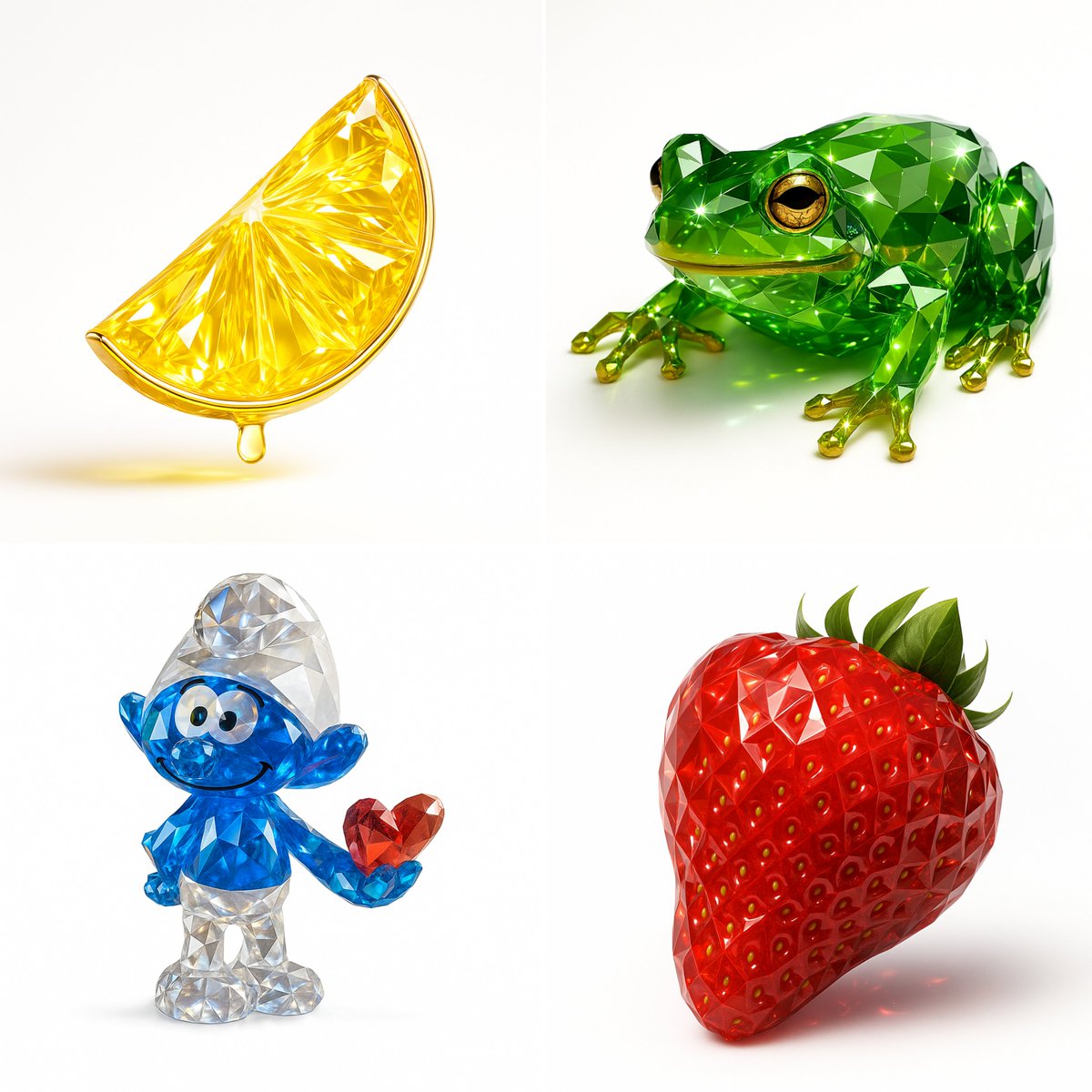
Recreate this image using the pamareters of the JSON provided. { "name": "Gemstone Render", "object": { "type": "auto", "detected_color": "auto", "form": "realistic, natural form preserved", "material": "crystal or faceted gemstone glass", "surface": "precision-cut facets, sharp reflections", "transparency": "high clarity with light refraction", "internal_features": "color depth, internal shimmer, and light dispersion" }, "color_and_light": { "primary_color": "{detected_color}", "highlight_effects": "specular highlights, gemstone brilliance, caustics", "lighting_setup": "studio lighting with white or soft background", "metallic_accents": { "enabled": true, "material": "gold or chrome", "application": "rim, stem, or edge detailing" } }, "style": { "artistic_style": [ "photorealistic 3D render", "Gemstone Render Style", "luxury object visualization" ], "design_language": [ "faceted precision modeling", "jewelry-like rendering", "optical depth and brilliance" ] }, "technical_details": { "render_engine": [ "Blender with Cycles", "Cinema 4D + Redshift/Octane" ], "rendering_techniques": [ "physically-based rendering (PBR)", "ray tracing", "global illumination" ], "resolution": "ultra high-res (4K–8K)", "post_processing": [ "subtle glow", "enhanced reflections", "color-preserving contrast boost" ] }
About this prompt
제공된 JSON의 pamareters를 사용하여 이 이미지를 재생성하세요. { “name”: “보석 렌더링”, “object”: { “type”: “auto”, //유형 “detected_color”: “auto”, “form”: “실제적이고 자연스러운 형태 유지”, “material”: “수정 또는 면 처리된 보석 유리”, “surface”: “정밀하게 절단된 면, 선명한 반사”, “transparency”: “고화질, 빛의 굴절”, “internal_features”: “색상 깊이, 내부 미광 및 빛의 분산” }, “color_and_light”: { “primary_color”: “{detected_color}”, “highlight_effects”: “스펙큘러 하이라이트, 보석 광도, 카우스틱”, “lighting_setup”: “흰색 또는 부드러운 배경의 스튜디오 조명”, “metallic_accents”: { “enabled”: true, “material”: “금 또는 크롬”, “application”: “가장자리, 줄기 또는 테두리 디테일” } }, “style”: { “artistic_style”:[ “사실적인 3D 렌더링”, “Gemstone Render Style(보석 렌더링 스타일)”, “럭셔리 오브젝트 시각화” ], “design_language”:[ “면 처리된 정밀 모델링”, “보석 같은 렌더링”, “광학적 깊이와 광도” ] }, “technical_details”: { “render_engine”:[ “Blender with Cycles”, “Cinema 4D + Redshift/Octane” ], “rendering_techniques”:[ “물리 기반 렌더링(PBR)”, “레이 트레이싱”, “글로벌 일루미네이션” ], “resolution”: “초고해상도(4K–8K)”, “post_processing”:[ “미묘한 발광”, “향상된 반사”, “색상 보존 대비 향상” ] }
함께 보면 좋은 프롬프트
View all





자주 묻는 질문
"보석 렌더링" 프롬프트는 어떤 용도로 쓰나요?
이 nature 프롬프트는 AI 이미지 생성용으로 설계되었습니다. nature 스타일의 결과를 만드는 데 도움을 주며 nano-banana-pro에 최적화되어 있습니다.
이 프롬프트는 어떻게 사용하나요?
프롬프트를 복사한 뒤 자주 사용하는 AI 이미지 생성 도구에 붙여 넣으세요. 화면비, 스타일, 네거티브 프롬프트 등을 조정해 결과를 더 정교하게 만들 수 있습니다.
이 nature 프롬프트에는 어떤 AI 도구가 가장 잘 맞나요?
이 프롬프트는 nano-banana-pro에 맞춰 특별히 최적화되었지만, 다른 인기 있는 image 도구에서도 잘 작동합니다.
이 프롬프트를 수정해도 되나요?
네. 원하는 창작 방향에 맞게 요소를 추가하거나 제거하고, 스타일 설명을 다듬거나, 다른 프롬프트와 조합해 더 독특한 결과를 만들 수 있습니다.